

Online deposits and the Stripe hold
Connect your account once in Connectors, choose the provider in Payments: the customer leaves the deposit during online check-in. A Stripe hold lasts 7 days.
Objective
By the end of this lesson, you will know how to turn on online deposits, in the right order, and never let a Stripe hold expire without a decision.
The essentials
Taking the deposit at the counter works, but Julie would rather the customer leaves it before arriving, during online check-in (chapter 6). That takes two settings, always in this order:
- connect the provider account, once, in Settings › Connectors, Deposits tab: Stripe (no key to enter, “Connect my Stripe account”), PayZen, Swikly or Gando;
- say which one takes deposits, in Settings › Payments, Online deposit card: “Enable online deposits”, then the provider.
Connecting an account does not turn it on: the second step puts it to work. The amount is still the one of each category, set in chapter 2.
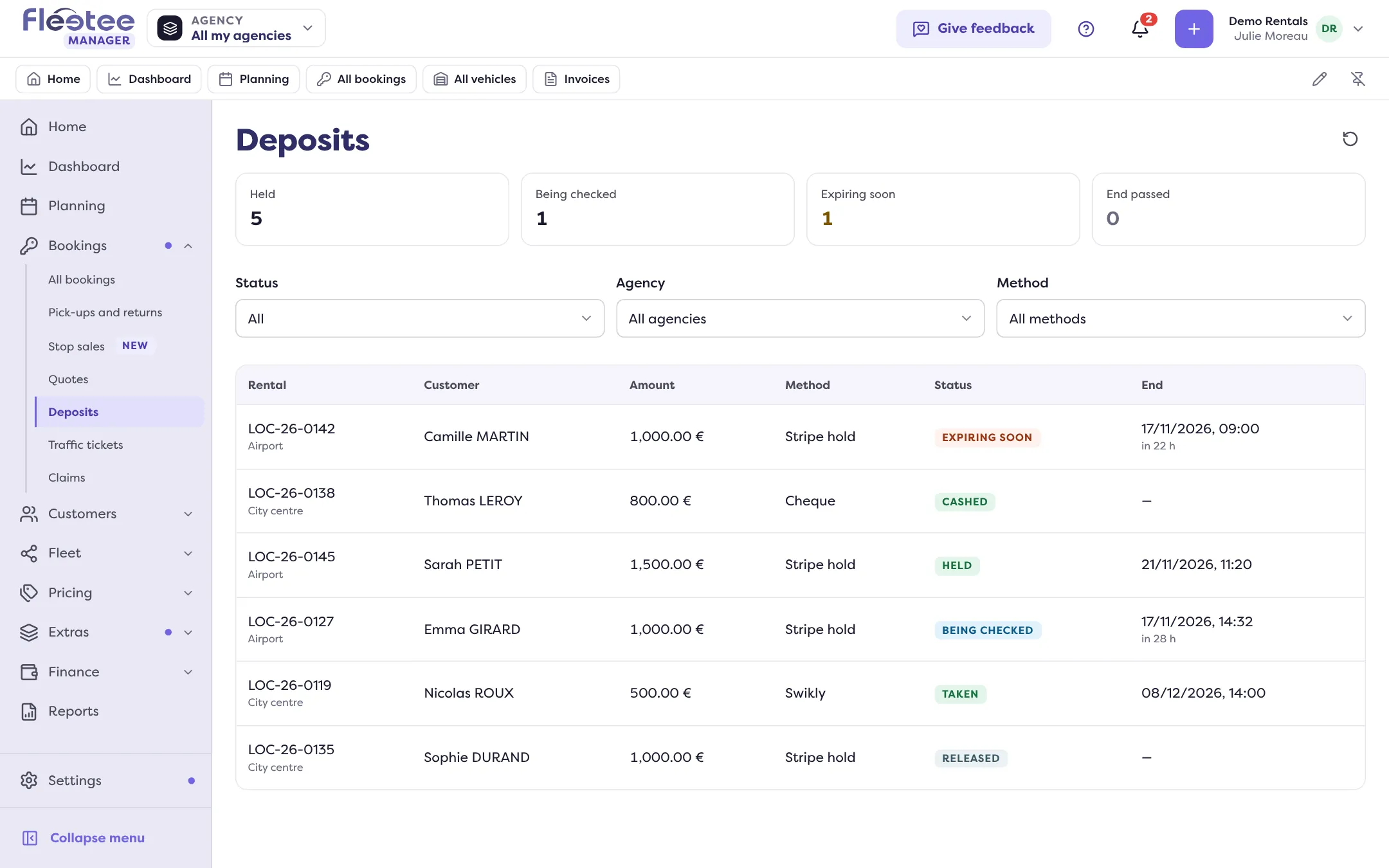
With Stripe, the deposit is a hold: the bank blocks the amount, but only for 7 days as standard. Fleetee reads the real end date from Stripe, shows it in the Deposit block (“Expires in 22 h 26”) and flags the deposit “Expiring soon” in the last 48 hours. For a long booking, the hold may end before the return: Julie watches the “Expiring soon” tile of Bookings › Deposits and decides before the end.
Key steps
Connect the account
Settings › Connectors › Deposits tab › provider card › “Connect”.
Turn on online deposits
Settings › Payments › Online deposit › “Edit” › “Enable online deposits”, choose the provider, then “Save”.
Check it is ready
The panel says “This setting allows online deposits”, or the reason it is blocked (account to complete, no provider selected).
Watch the holds
“Expiring soon” tile of Bookings › Deposits, and “Synchronise” in the Deposit block to read the status from Stripe again.
Only the administrator manages connectors and turns on online deposits for the company. An agency manager can set their own agencies (“Set my agencies”) if the company customises per agency.
Once the hold has expired at Stripe, it can be neither returned nor retained from. Decide as soon as the “Expiring soon” badge appears.
Further reading
Check what you learned
Answer every question correctly to complete the lesson.
Progress kept on this device. Soon with your Fleetee Account.