

Getting paid: payment, payment link, down payment
Record a payment taken at the counter, send a payment link, ask for a down payment when booking: three ways to get paid, and what each changes on the booking.
Objective
By the end of this lesson, you will know how to record a payment, send a payment link and set the down payment your bookings ask for.
The essentials
A payment is not an invoice: it is money received, recorded on the booking, which reduces the amount left to pay. Julie has three ways to get paid:
- at the counter: the customer pays cash, by card or by cheque, and Julie records the payment on the booking (“Add a payment” › “Record a payment”). On a booking “Awaiting payment” or “Reserved”, this payment confirms it;
- remotely: she sends a payment link, when creating the booking or later from its record. The amount left to pay only drops once the link is paid;
- in advance: she sets a down payment, for example 30% when booking, which each new booking then asks for.
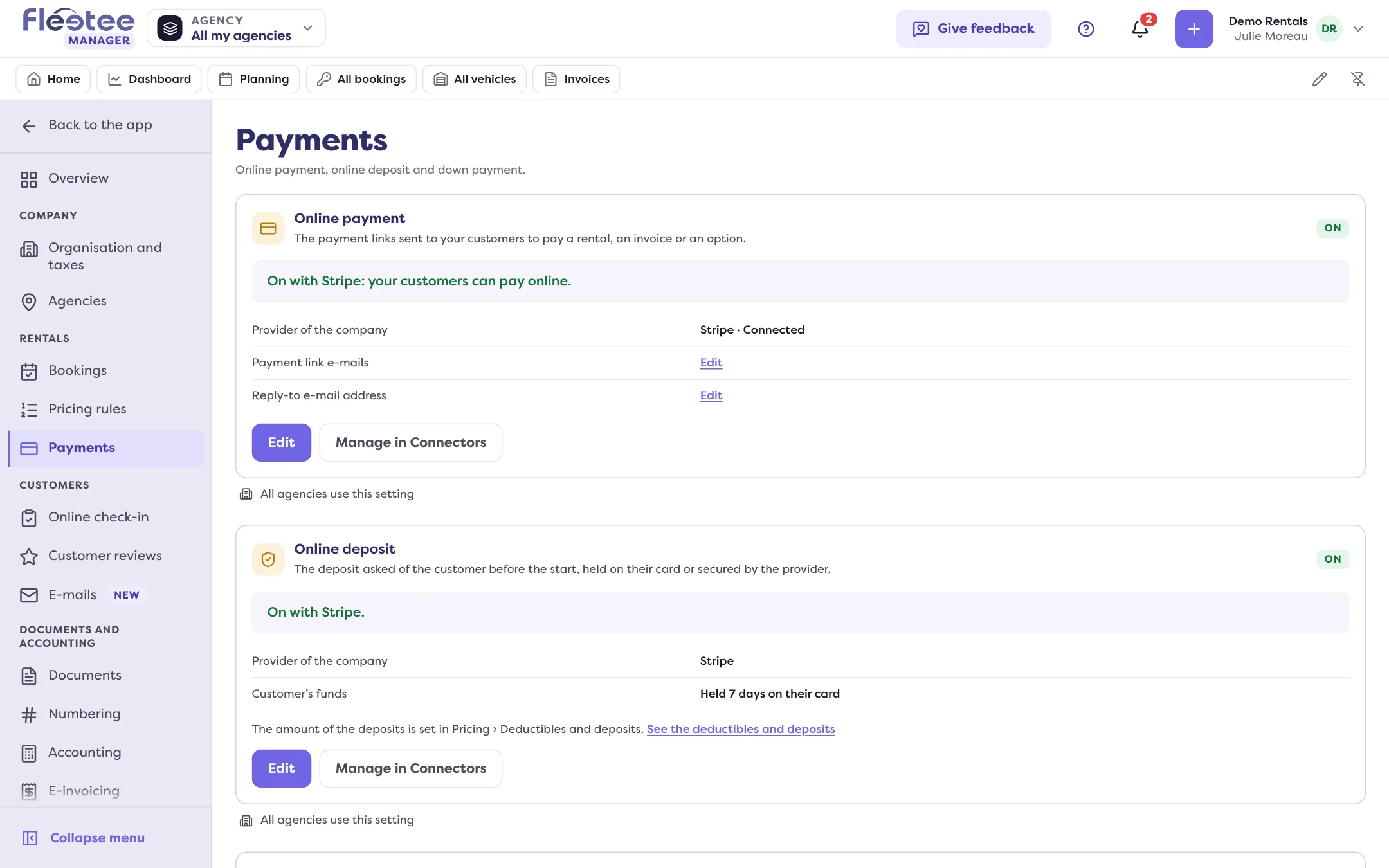
The payment link needs an online provider. Same principle as for deposits: the account is connected once in Settings › Connectors, Payments tab, then chosen in Settings › Payments, Online payment card. With no provider, creating a booking says so: “Set up online payment to send a link.”
Key steps
Turn on online payment
Settings › Payments › Online payment › “Edit” › “Turn the online payment on”, choose the provider, “Save”.
Set the down payment
“Down payment of the rentals” card › “Edit”: the full payment, or a down payment from 10% to 90%. You can also propose a payment link by default (none, the down payment or the total).
Send a link when creating
Payment step of “Create a rental” › “Payment link”: check the amount, then “Create the rental”.
Record a payment received
Booking record › Pricing & payments › “Add a payment” › “Record a payment”: amount, method, agency, date, then “Save the payment”.
Only the administrator sets the company’s online payment and down payment; an agency manager sets their own agencies if the company customises per agency. Everyone, agents included, can record a payment or send a link.
With PayZen, Systempay, PayZen by OSB or Lyra Collect, as long as test mode is on, no real payment is collected. Turn it off before opening payment to your customers.
Further reading
Check what you learned
Answer every question correctly to complete the lesson.
Progress kept on this device. Soon with your Fleetee Account.