

How much does each of my vehicles earn and cost?
- Manager v3
- Administrator
- Agency manager
- Accountant
- 1:00
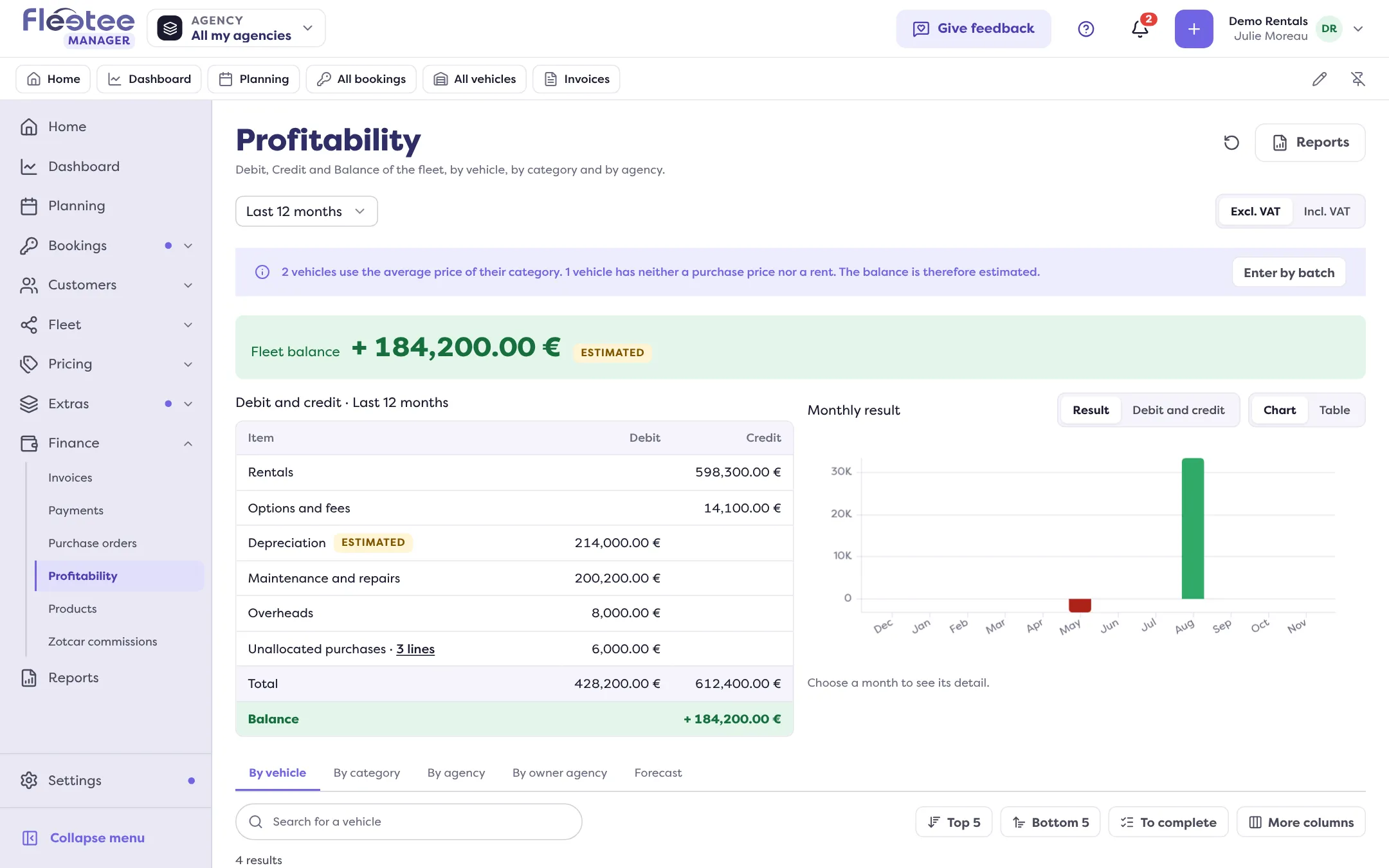
In short. Finance › Profitability gives, by vehicle, category and agency, the Credit (what rentals earn), the Debit (what the vehicle costs) and the Balance. Enter the purchase price or rent for exact figures.
The Profitability page says what each vehicle earns and costs, with no equivalent in the previous version. It adds nothing across currencies: Fleetee calculates, the screen displays.
Read the page
- Fleet balance at the top: the sum of the balances. If it is estimated, the page says so: at least one line is estimated, or a vehicle has no price yet.
- The tabs By vehicle, By category, By agency, By owner agency and Forecast (see below).
- For each line, Debit, Credit and Balance, and markers in the Notes column: In deficit, No depreciation, To sell. The lists Top 5, Bottom 5 and To complete isolate the cases to look at.
- Vehicles are calculated as it goes: “Calculation in progress: N vehicles out of N”; the page updates itself.
What goes into Credit and Debit
- Credit: what completed rentals earn (excl. tax, discounts deducted), with their options and fees, spread month by month in proportion to the days rented. A cancelled rental only counts for its cancellation fees.
- Debit: what the vehicle costs: depreciation (or lease payments for a finance lease, LOA or LLD), the loan interest of a bank loan, maintenance and repairs, insurance, fuel, tyres, cleaning, taxes, other costs and claims (net of damage re-invoiced). Costs come from your purchases linked to the vehicle; an intervention with no purchase counts for its cost.
- Balance: Credit minus Debit.
- Overheads are not in a vehicle’s result; a fine is neither Debit nor Credit.
Get accurate figures
A vehicle with no purchase price or rent uses the average price of its category: its balance is estimated. To fix it:
- In the vehicle’s file, Profitability panel, enter its acquisition (purchase price, rent, loan…).
- For several vehicles bought together, “Enter by batch”: tick them (grouped by model and date, model or category), enter the acquisition once, “Save on N vehicles”.
- Unallocated purchases (purchase lines with no vehicle) count in the Debit of the agency and of the fleet until they are allocated to a vehicle, to several, or to overheads.
The Forecast tab
It lists the exits planned over 12 months (end of contract, planned disposal, a vehicle in deficit for months, maintenance rising…), with “Sale now”, “In 6 months” or “In 12 months”, the resale value to enter and the estimated renewal.
A vehicle that changes agency
Its past stays with the former agency; only what comes after the change goes to the new one.
Where to find it: Finance › Profitability
Where to find it: Finance › Profitability
Go further
Updated on 18 November 2026 with version 3.0