

How do I schedule my vehicles’ maintenance?
- Manager v3
- Administrator
- Agency manager
- Rental agent
In short. Fleet › Maintenance › Maintenance plans › “Add a plan”: give a name, a time and/or mileage rule, the categories and agencies concerned, reminders and a starting point. Fleetee then flags the due dates.
A maintenance plan says how often a vehicle must go to the workshop: every 6 months, every 15,000 km… Fleetee then calculates the due dates of each vehicle concerned, warns you, and lists them in the To do tab (see How do I follow all my fleet’s maintenance in one place?).
Open Fleet › Maintenance › Maintenance plans
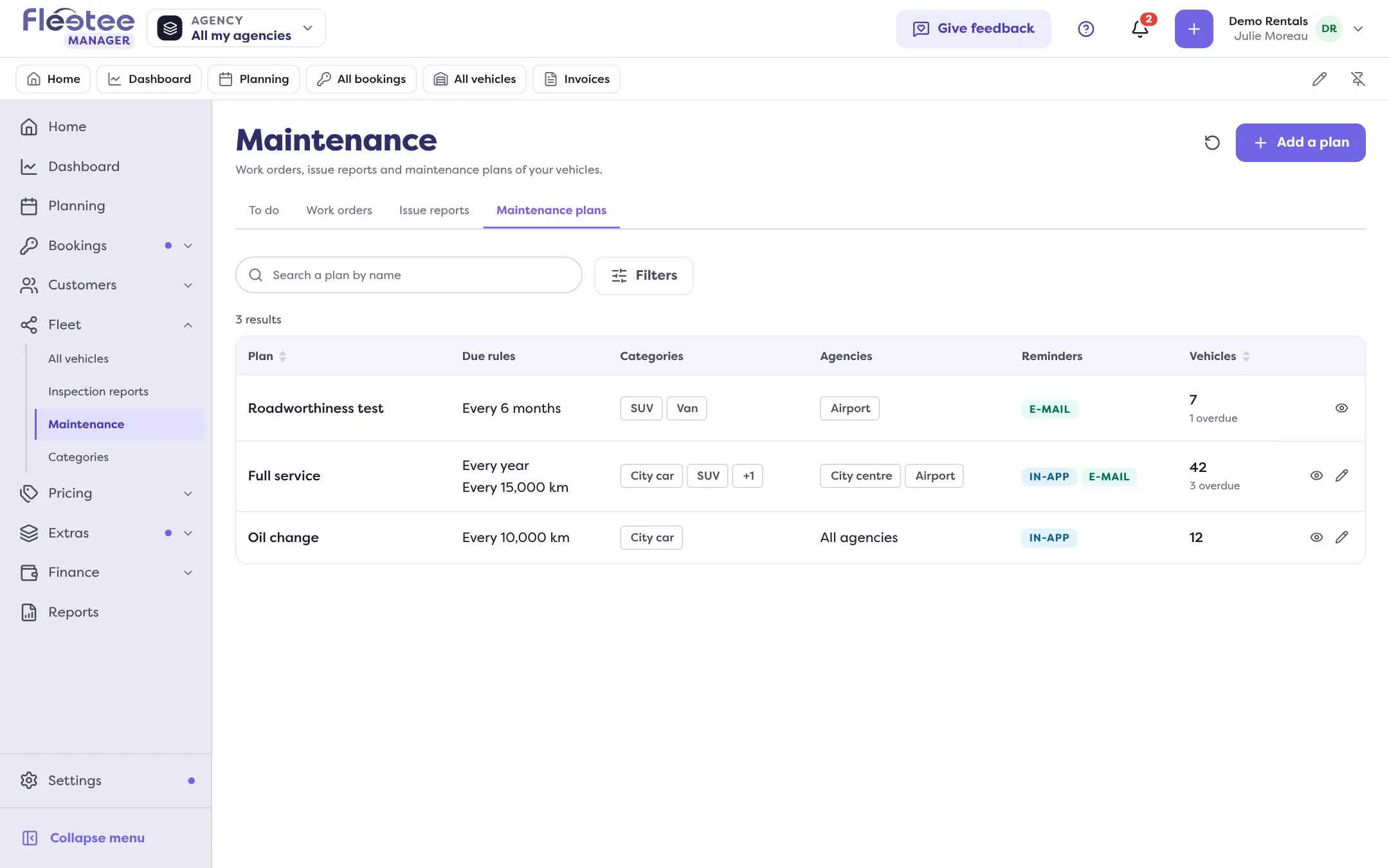
The list gives for each plan its due rules, categories, agencies, reminders and the number of vehicles overdue, due soon or scheduled. Click “Add a plan” (or “Create the first plan”).
Name the plan
For example “Full service”. The name is also the type of the work orders and issues tied to the plan: if you rename it later, those already linked stay linked but keep the old name.
Choose the rules
A “By elapsed time” rule (“Every…” months or years, counted from the last visit, otherwise from registration), a “By mileage” rule (every N km), or both: the due date comes as soon as one of the two is reached. For each, “Warn” N days or N km before. You can also set a different first deadline (for example the first service at 20,000 km).
Choose the scope
The categories covered (the plan applies to every one you choose) and the agencies covered (or all). Removing a category stops following its vehicles’ due dates for this plan; they come back if you put the category back.
Set the reminders
In-app reminder and/or E-mail reminder. For e-mail, one address, or one address per agency; left empty, the reminder goes to the company’s e-mail address.
Choose the starting point
“From today and the current mileage”: each vehicle starts its first cycle today, so in principle none is overdue right away and no reminder goes out in bulk. “From each vehicle’s history”: the calculation starts from the last known visit, otherwise from registration and 0 km; vehicles already on the road can be overdue right away and receive reminders.
Click “Create the plan”
“The plan “…” was created.” Its sheet then shows where the plan’s vehicles stand, its rules and its reminders.
Edit or delete a plan
A change or a deletion applies to all the categories of the plan, not just one. Deleting a plan removes its vehicles’ due dates and it is no longer offered as a work order type; the work orders and issues already linked stay in place.
After the visit
When the vehicle has been to the workshop, finish the work order tied to the plan (status Done): the plan restarts from that visit and the next due date is recalculated. With no work order, click “Mark as done” in the To do tab and enter the last visit. A Planned work order marks the plan’s due date as planned; cancelled, the due date goes back to “to do” once the threshold is reached. See How do I log a repair or service on a vehicle?.
Where to find it: Fleet › Maintenance › Maintenance plans
Where to find it: Fleet › Maintenance › Maintenance plans
Go further
Updated on 18 November 2026 with version 3.0