

How do I invoice a booking group?
- Manager v3
- Administrator
- Agency manager
In short. In the group file, “Invoices” section, choose “One invoice for the group” or “One invoice per rental”, then “Create the invoice of the group”. A preview shows the amount and the recipient; you save as a draft or validate.
This is reserved to the administrator and the agency managers. With another role, ask one of them to do it.
A group can be invoiced in one block, to the group’s billing customer, or booking by booking. The choice is made in the group file.
Open the group file, “Invoices” section
From a booking of the group, “View group”. The “Invoices” section shows the “Left to invoice” and the invoices already created (“No invoice” otherwise).
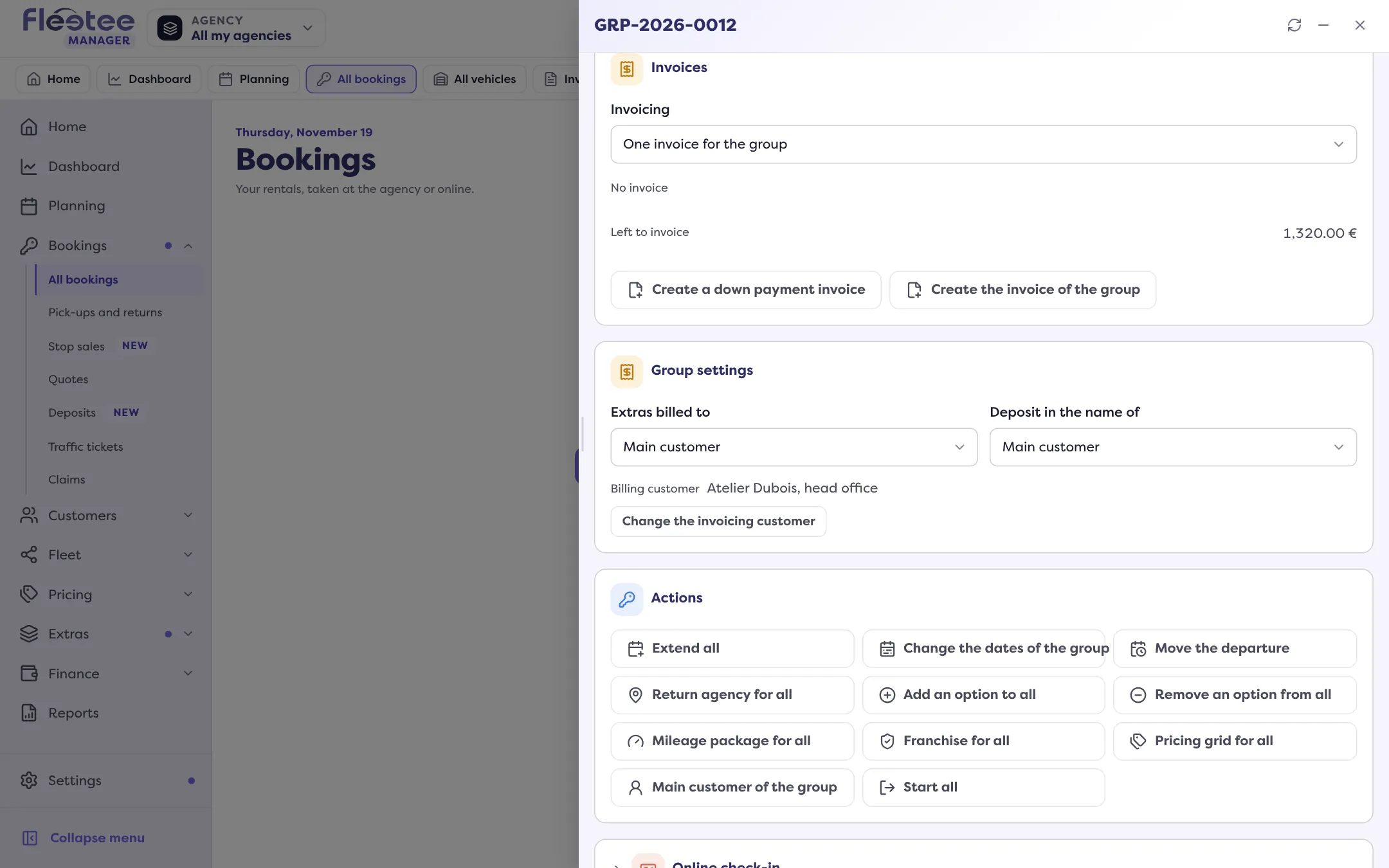
Choose the “Invoicing” mode
“One invoice for the group”: a single invoice for all bookings. “One invoice per rental”: each booking has its own invoice, as usual. “Invoicing changed” confirms the change.
Click “Create the invoice of the group”
Depending on the group’s state, the button may also be called “Create a down payment invoice”, “Create a balance invoice” or “Create an additional invoice”. A window opens, titled “Invoice of the group” (or “Down payment invoice”, “Balance invoice”, “Additional invoice”).
Check the preview
The window gives the “Total”, the recipient (“Billed to”) and, for a down payment invoice, the “Amount”. Bookings not included are named: “Invoiced separately”, “Already invoiced”, “Cancelled”, “To credit”, “Nothing to invoice”. “Open the PDF” shows the document.
Save or validate
“Save as draft” keeps the invoice editable; “Validate” finalises it (“Invoice validated”). If the invoice does not comply with e-invoicing, Fleetee saves it as a draft and says so; “Validate anyway” is offered.
Who is the invoice addressed to?
To the group’s billing customer. To change it, see How do I change who pays for the group?. Once a main invoice is issued, the payer can no longer be changed.
Correcting a group invoice
To remove a vehicle from the invoice, “Credit note of a vehicle” generates that vehicle’s credit note (“Generate the credit note”, then “Credit note issued”). If a group down payment is deducted from the invoice, Fleetee tells you the order to follow: for example first make the credit note of the down payment invoice, then create the group invoice again. See How do I cancel an invoice with a credit note?.
If creation is refused
- “Nothing to invoice for this group”: all bookings are already invoiced.
- “This group is invoiced per rental”: switch to “One invoice for the group”, or invoice each booking from its file.
- “The invoice of the group already exists” / “The group already has an invoice”.
- “The price of LOC-… is not known”: enter the booking’s price.
- “LOC-… belongs to another billing identity”: the group’s bookings do not share the same billing identity.
- “The amount is above what is left to invoice” (for a down payment): enter a lower amount.
A booking invoiced with the group shows, in its file, “Invoiced with the group” and “View the invoice”. It no longer has an invoice of its own: see How do I create a booking’s final invoice?.
Where to find it: Group file › “Invoices” section › “Create the invoice of the group”
Where to find it: Group file › “Invoices” section › “Create the invoice of the group”