

How do I get a document signed at the counter?
- Manager v3
- Administrator
- Agency manager
- Rental agent
In short. At the counter, the customer signs on your device or on their phone: for a quote, “Have it signed at the counter”; for a contract, “Sign on site” or “Validate the contract” › “Sign online”. Fleetee waits for the signature, then validates the document.
The customer is in front of you. Rather than e-mailing them a link, they sign right away, with a finger, on a device. The flow is the same for a quote, a contract and an amendment.
For a contract
Create the booking with “Prepare the contract right after” ticked
The box (“Preview, sign on the spot or send to the customer”) opens the contract as soon as the booking is created, with “Sign on site” first. It is only useful if the booking is far enough along to have a contract: otherwise Fleetee says “The contract can be prepared once the rental is confirmed: you will do it from its file.”
Or open the contract from the file
Booking file › Docs panel › Contract card › “View the contract”. Click “Validate the contract”, then “Sign online”. See How do I generate the contract and get it signed?.
Hand over the device, or the code
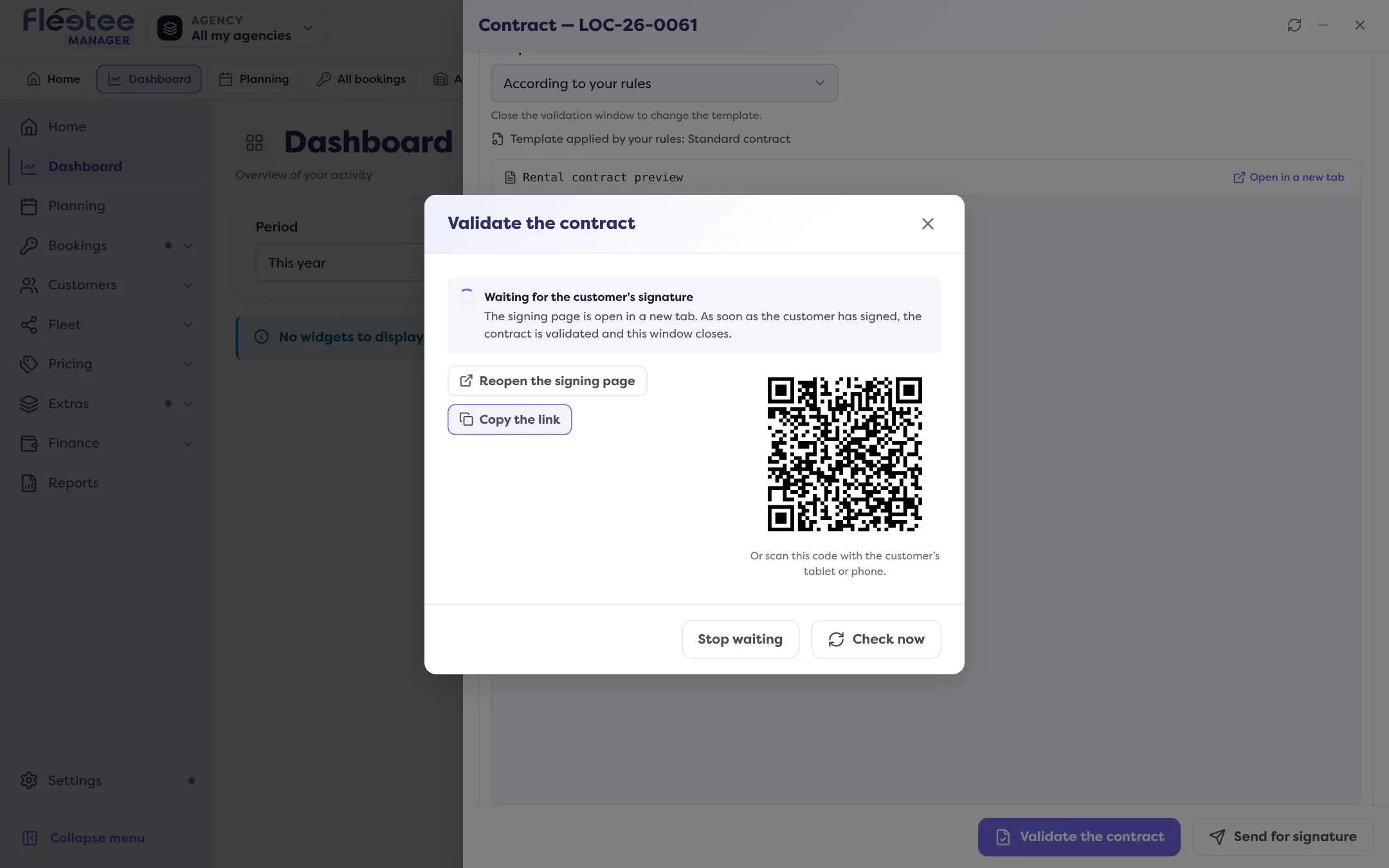
The signing page opens in a new tab: hand the device over. Otherwise, the “Waiting for the customer’s signature” window offers “Copy the link” and a QR code: “Or scan this code with the customer’s tablet or phone.” If the browser blocks the opening, “Open the signing page” reopens it.
Wait for the signature
As soon as the customer has signed, the contract is validated and the window closes: “The contract was signed by the customer and validated.” If automatic tracking does not answer, click “Check now” (“The contract is not signed yet.” until it is).
For a quote
Open the quote’s Quote panel, “Customer signature” card, then “Have it signed at the counter”. If your company has the quote accepted rather than signed, the button is called “Have it accepted at the counter”. See How do I get a quote signed online?.
For an amendment
After a change to the booking, open the contract, Amendment tab, then “Validate the changes and generate the amendment” › “Sign online”. Same wait (“The amendment was signed by the customer and validated.”). See What is a contract amendment and when does Fleetee create one?.
Stopping the wait
“Stop waiting” (then “Stop waiting for the signature?” to confirm) stops automatic tracking. If the customer signs afterwards, the document is validated all the same: reopen it to see it. If tracking was interrupted, “Resume tracking” reopens the signing page.
No device? No signature?
“Validate without signature” validates the document with no online signature. It is final: the contract gets its number and any later change will go through an amendment.
Where to find it: Quote: Quote panel › “Have it signed at the counter”. Contract: “Sign on site” or “Validate the contract” › “Sign online”
Where to find it: Quote: Quote panel › “Have it signed at the counter”. Contract: “Sign on site” (at creation) or “Validate the contract” › “Sign online”
Go further
Updated on 18 November 2026 with version 3.0