

How many e-mails does my plan include?
- Manager v3
- Administrator
- Agency manager
In short. Your plan includes a monthly e-mail volume, depending on its tier. Settings › E-mails › Volumes and quotas shows what went out, what is left and what happens once the volume is reached: keep sending, or block non-essential e-mails.
Each month, your plan includes an e-mail volume sent to your customers: confirmations, payment links, contracts, reminders… The volume depends on your plan and your vehicle tier. It resets to zero on the 1st of every month.
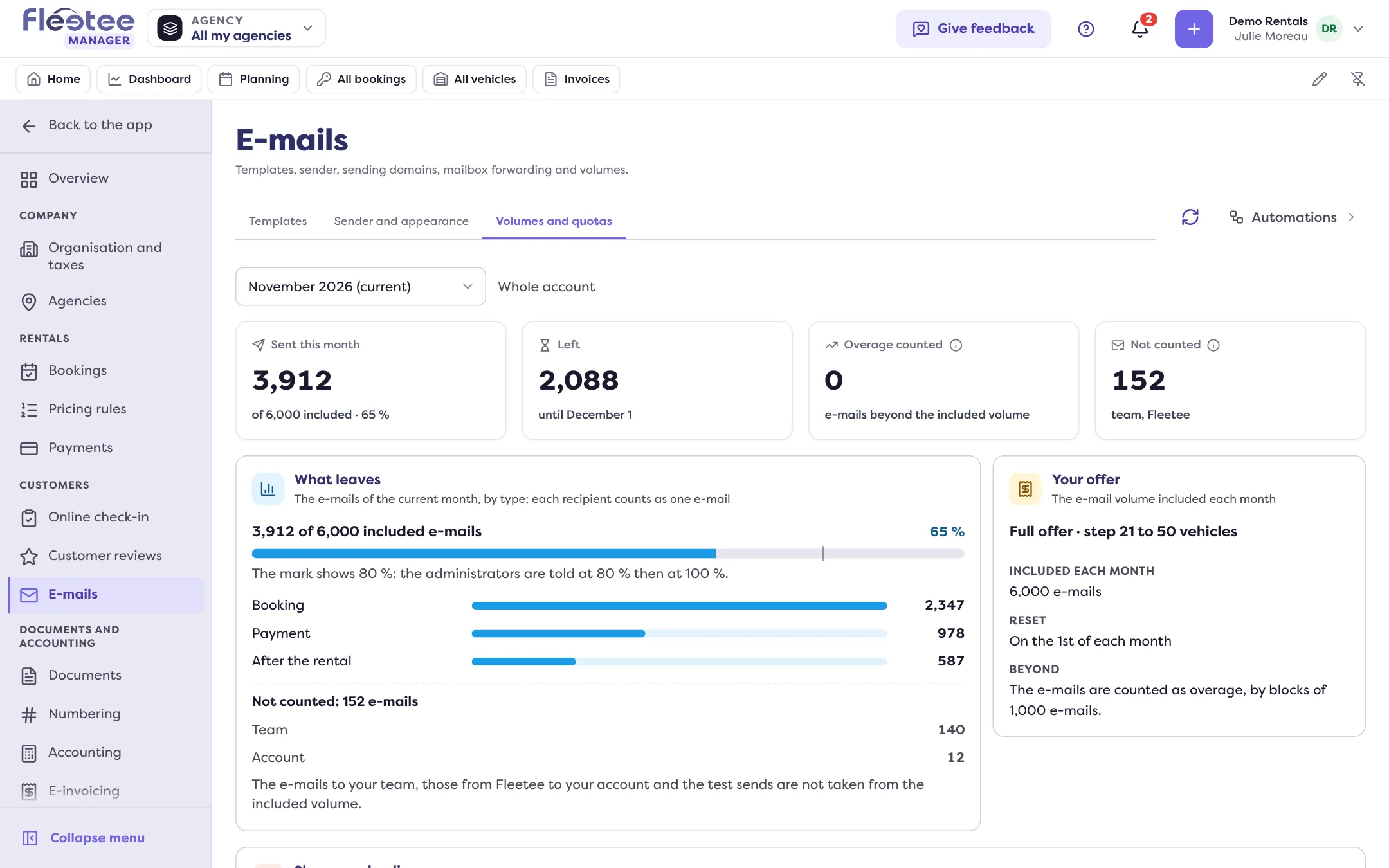
See where you stand
Open Settings › E-mails, Volumes and quotas tab. The “Month shown” menu lets you look back at a past month. The page shows:
- Sent this month: “3,912 of 6,000 included” and the percentage used, with what is Left until the end of the month.
- What leaves: the month’s e-mails by type (Booking, Payment, Online check-in, Documents, Digital key, After the rental, Free e-mails…). Each recipient counts as one e-mail.
- Your offer: the plan and tier read (for example “Full offer”, “step 21 to 50 vehicles”), the volume included each month, and the reset on the 1st of every month.
- Not counted: e-mails to your own team, those Fleetee sends to your account, and test sends are not taken from the volume.
During the free trial, the volume is that of the plan’s smallest paid tier; on the free plan, it is a small volume of its own. If the page says “Your offer has no e-mail volume set: no e-mail is held back, they all leave.”, nothing is limited.
The volumes included per plan and tier are not on the Fleetee pricing page: read them in the Volumes and quotas tab.
The alerts
Administrators are warned at 80% then at 100% of the volume. At 80%, the page says “80% of the included volume reached: … e-mails left this month. Nothing is blocked.” At 100%: “Included volume reached”.
What happens when the volume is reached
It is the administrator’s choice, under “When the included volume is reached”:
- “Keep sending” (recommended): all your e-mails leave. What goes beyond the volume is counted as overage, in blocks. Your customers see no difference.
- “Block non-essential e-mails”: beyond the volume, only the e-mails that are always sent leave. The others show “Blocked: quota” in the e-mail history.
Always sent, even beyond the volume: payment and deposit links, online check-in links, digital keys, invoices and credit notes, and contracts. This list is set by Fleetee. A send to several recipients that the volume blocks never leaves in part: either all of it leaves, or nothing.
If a reply in the inbox is blocked, Manager says “Monthly e-mail volume reached: this reply does not leave. Your account blocks non-essential e-mails.” To understand why a customer did not receive an e-mail, see My customer says they didn’t get an e-mail: what should I check?.
Shares per agency
Under “Shares and policy”, the administrator can give each agency a share of the volume, to spot the one that uses the most. A share is a landmark: nothing is blocked per agency, the account’s policy applies to the total. The agency’s manager and the administrators are told at 80% of its share. The shares cannot add up to more than the included volume.
Who can do what
The administrator and the agency manager see the volumes. Only the administrator changes the shares and the policy: “Only an administrator of the account can change the shares and the policy.”
Where to find it: Settings › E-mails › Volumes and quotas
Where to find it: Settings › E-mails › Volumes and quotas