

How do I change the sender name and address of my e-mails?
- Manager v3
- Administrator
- Agency manager
In short. Settings › E-mails › Sender and appearance › Sender: change the name shown and the reply address. The sending address is read-only; to send from your own address, add your domain in “Sending domain”.
What your customer sees in their mailbox is a name and an address. You set the name and the address where they can reply. The sending address itself depends on your sending domain.
Open Settings › E-mails › Sender and appearance
The Sender part opens first. The other parts are Branding, Languages, Sending domain, Mailbox forwarding and Automatic reply. The “Settings for” choice targets the whole account, or an agency that has its own settings. The account settings are the administrator’s; an agency manager sets those of their agencies.
Change the “Sender name”
Shown in the customer’s inbox (100 characters at most, on one line). Left empty, the name in grey applies.
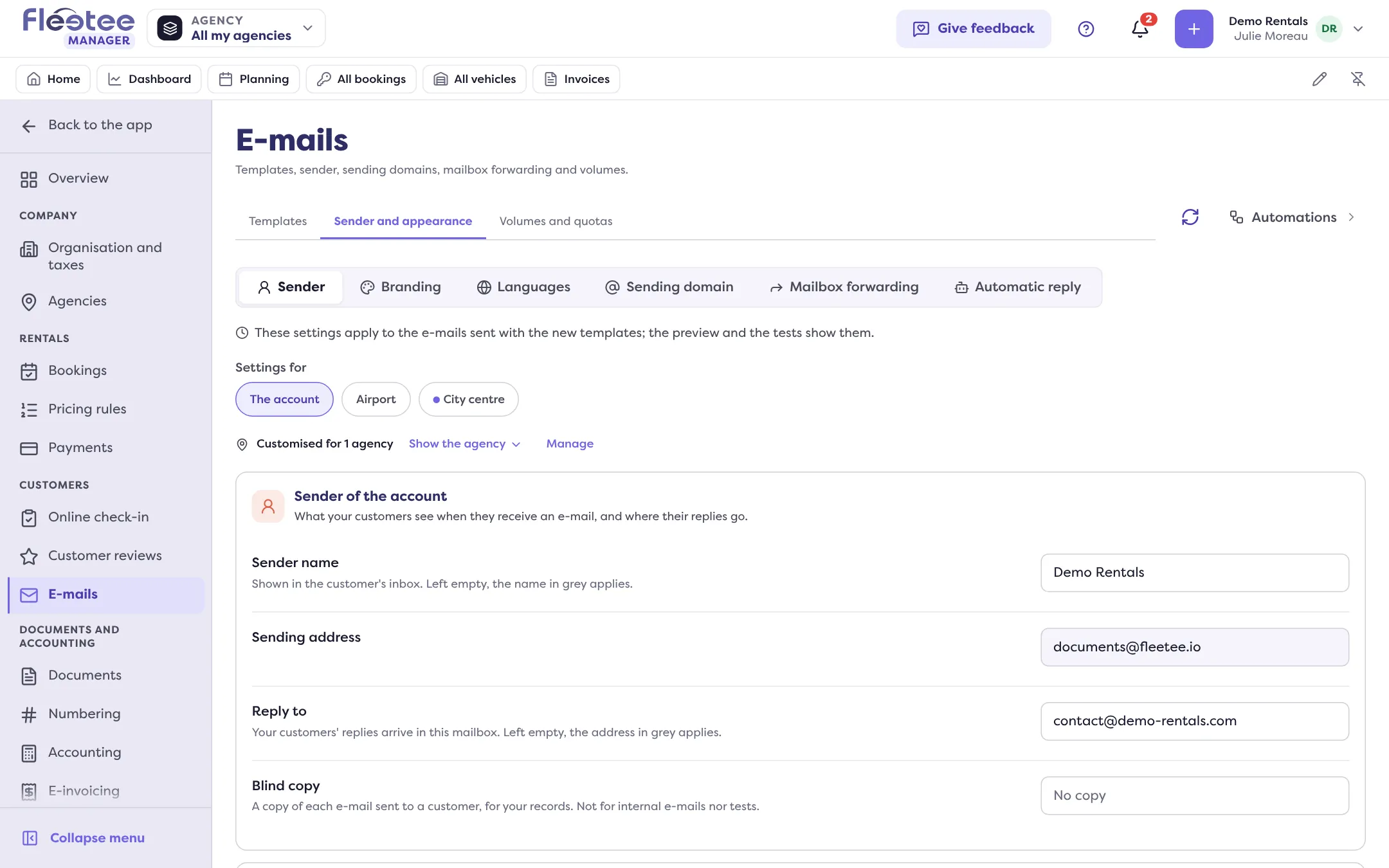
Choose the “Reply to” address
Your customers’ replies arrive in this mailbox. Left empty, the address in grey applies. For replies to also arrive in Fleetee, see How do I reply to customers from the shared inbox?.
Add a “Blind copy” (optional)
A copy of each e-mail sent to a customer, for your records, but not for internal e-mails or tests. It is set for the whole account; an agency sees it read-only.
Save
The “In the customer's inbox” block shows what your customers will see.
The sending address
“Sending address” is shown but cannot be typed here: your e-mails leave from Fleetee’s address, or from the one of your verified domain. To send from your own address (for example contact@renter.com):
- Open Sending domain. Write your domain without “www” or “https://” (an address like gmail.com cannot be used) and the start of the sending address (“contact” for contact@renter.com). This mailbox must exist: it is where your customers reply. Confirm it, then click “Add the domain”.
- At the company that manages your domain name, add the records Fleetee shows (“Show the records”). Fleetee checks automatically every 30 minutes for 72 hours; “Check now” does it right away.
- When the domain becomes Verified, your e-mails can leave from this address. “Change the address” changes the start of the address.
Only the administrator manages the sending domain. Depending on the state of your account, a message may say that your e-mails keep leaving from Fleetee’s address even with a verified domain.
Who can edit
The account settings belong to an administrator. An agency manager picks one of their agencies to set its own; “Back to the account's setting” cancels the customisation.
Where to find it: Settings › E-mails › Sender and appearance › Sender
Where to find it: Settings › E-mails › Sender and appearance › Sender
Go further
Updated on 18 November 2026 with version 3.0