

My customer can’t register their deposit: what should I do?
- Manager v3
- Administrator
- Agency manager
- Rental agent
In short. Open the rental’s “Online check-in” card: the “Booking deposit” line says whether nothing is asked (a setting), whether the setup is to finish, or whether the customer simply has not paid. Each cause has its fix.
Check first
Open the rental page, Customer tab
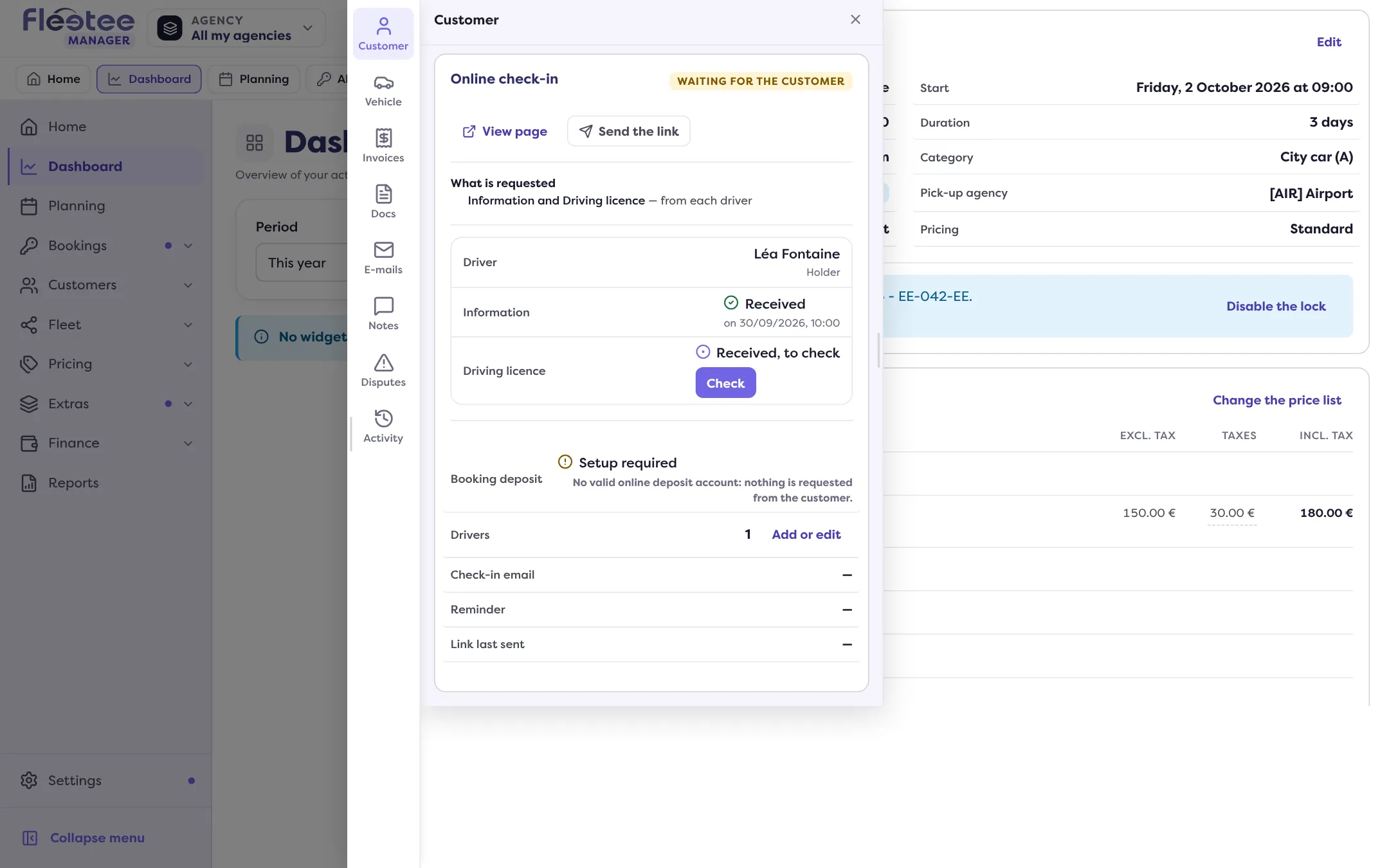
The Online check-in card shows where the customer stands and what blocks handing over the keys.
Read the “Booking deposit” line
It shows a state: Paid, Not paid yet, Setup required or Not requested for this booking. Under the state, a sentence gives the reason.
Look at the Deposit block
In Pricing & payments, the Deposit block must show the deposit taken. If it does not, it is not registered: see How do I read a booking’s Deposit block?.
Cause 1: nothing is asked of the customer
The customer cannot register what they are not asked for. The card says so:
- “No deposit is chosen for this booking: nothing is requested from the customer.” Click “Choose the deposit”, or “Change the deposit” if one is chosen.
- “The deposit of this booking is 0: nothing is requested from the customer.” Its amount is set when the booking is created: choose another deposit with “Change the deposit”. The amounts are set in Extras › Deductibles and deposits.
- “No valid online deposit account: nothing is requested from the customer.” The provider is not linked or its account is to finish: read Connect your account, then check the Online deposit card in Settings › Payments (step by step).
A digital key can stay locked until the deposit is taken: “The key stays locked until the deposit is taken”.
Cause 2: the amount in euros is missing
Causes 1 (the amounts), 2 and 3 are fixed in Extras, Settings › Payments and the provider’s panel: pages reserved to the administrator and the agency manager. If you are a rental agent, ask one of them to check them.
With Swikly or Gando, the deposit is taken in euros. If the company’s currency is not the euro, each deposit must have its euro amount. Without it, the card says “Enter the EUR amount of this deposit” and the deposit is not asked of the customer.
In Extras › Deductibles and deposits, Deposits tab, a line carries the mention “EUR amount to fill in”. Open it and enter the amount charged by the provider.
Cause 3: the provider’s account is not ready
- Stripe: if the connector’s panel shows “Payments blocked” or “Waiting for Stripe”, complete your Stripe profile.
- PayZen: the deposit goes through the “Reservation and rental” option, which PayZen must open on your shop. Until it is done, your renters see a refusal on the payment page.
- Swikly: the payment feature must be enabled by Swikly, the account validated, and the currency the same as on the Swikly account.
Cause 4: the customer did not finish their journey
If everything is set up properly, the line says Not paid yet: the customer did not go to the end.
- Remind them: in the Online check-in card, “Send the link” (or “Resend the link”) sends the check-in e-mail again.
- Ask your customer to check that their card is valid, that its limit covers the deposit amount and that their bank allows the operation.
- With Stripe, look at your Stripe space for the details of the operation.
- With Gando, a refusal comes from Gando’s solvency analysis, which does not share the details. You stay free for what follows: refuse the rental or ask for a deposit another way.
If you take the deposit another way
Take it at the counter with “Add a deposit” (on a reserved, confirmed or ongoing rental), then, in the Online check-in card, “Validate manually” the Deposit step. The Manager asks you to confirm: “Do you really want to validate the Deposit step manually?”
Still stuck?
Write to support with the rental number and what the “Booking deposit” line says.
Go further
Updated on 18 November 2026 with version 3.0