

How do I read a booking’s Deposit block?
- Manager v3
- Administrator
- Agency manager
- Rental agent
- 0:58
In short. In Pricing & payments, the Deposit block shows each deposit: amount, status, platform or method, end of the hold, reference, movements and certificates. “Release”, “Retain” and “Synchronise” follow what the deposit allows.
The Deposit block is in Pricing & payments, under the payments. It shows what the customer left as a guarantee and what became of it. Each deposit of the rental has its own card.
Before the deposit is taken
- On a quote, or while nothing is taken, the block shows the Planned deposit: the amount asked when the quote is converted. If there is none: “No deposit”.
- Once the rental is created with no deposit taken: “No deposit held”. On a confirmed or ongoing rental, the “Add a deposit” button lets you take one.
- The planned amount is set per category, in Extras › Deductibles and deposits. Read Set deductibles and the deposit amount per category.
What a card shows
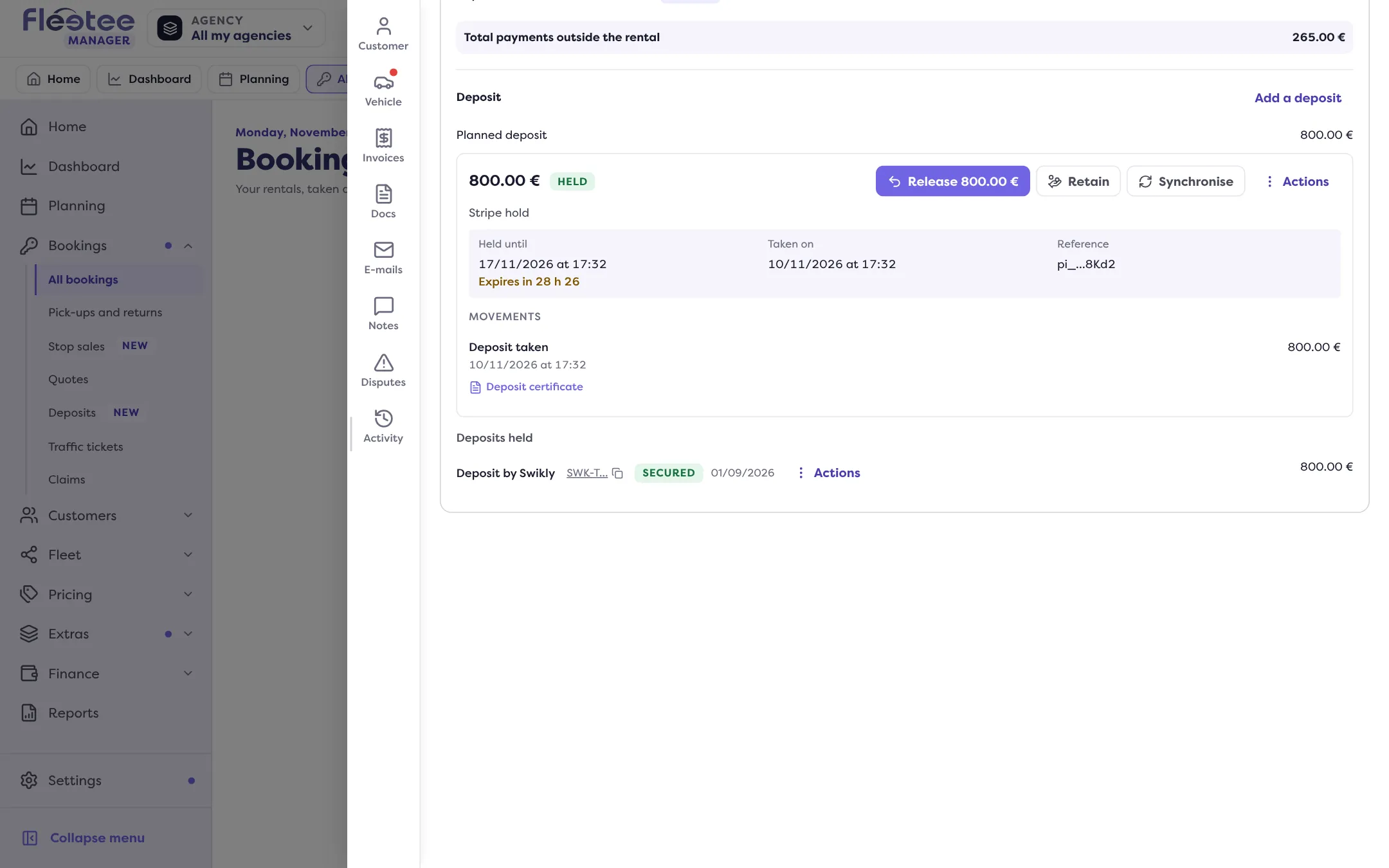
- the amount and a status badge;
- the platform or method: “Stripe hold”, “Saved card (Stripe)”, “PayZen hold”, Swikly, Gando, or the method entered at the counter (cash, cheque, card, bank imprint, transfer);
- “Held until” (a hold) or “Valid until” (a guarantee that holds no funds, like Swikly or Gando). In the last 48 hours, the time left shows: “Expires in 22 h 26”. Once the end has passed: “End of the hold” or “End of the deposit”;
- “Taken on”, the date it was taken;
- “Available”, when only part is left to give back;
- “Retained” and “Given back”, after a retention;
- “Reference”, the platform’s.
A group’s deposit carries the mention “Deposit of the group GRP-…”; a member who does not read the rental that carries it only sees “Covered by the deposit of the group”.
The statuses
| Status | What it says |
|---|---|
| Held | A hold keeps the amount on the customer’s card (Stripe, PayZen). |
| Taken | A guarantee is in place; no funds are held (Swikly, Gando). |
| Cashed | Deposit taken outside a platform, at the counter. |
| Expiring soon | The end of the hold falls within 48 hours. |
| End passed | The end date has passed, with no answer from the platform. |
| Being checked | An operation is waiting for the platform’s answer. |
| To release | Deposit of a group whose rentals are all back. |
| Released | The deposit was given back. |
| Partially retained, Fully retained | All or part was kept for charges. |
| Expired | The hold ended at the platform. |
| Deleted | The deposit was deleted (recorded by mistake). |
The buttons
They only show if the deposit allows them:
- “Release” followed by the amount: give the deposit back;
- “Retain”: keep part of it for charges;
- “Synchronise”: reads the status at the platform again. It only exists for a Stripe hold and for Swikly;
- an Actions menu on each payment line.
The movements
Under the facts, Movements lists what happened, newest first: “Deposit taken”, release asked, “Given back”, “Retained”, “Balance returned”, “Hold expired at …”. Each gesture produces its document, attached to its movement: Deposit certificate, Release certificate, Retention detail, with the proofs attached. They are ready to hand to the customer.
For Stripe holds that expire, read My Stripe hold expires: what should I do?.
Where to find it: Rental page › Pricing & payments › Deposit
Where to find it: Rental page › Pricing & payments › Deposit
Go further
Updated on 18 November 2026 with version 3.0