

Where can I read and export my customer reviews?
- Manager v3
- Administrator
- Agency manager
In short. Customers › Customer reviews lists every review with the average rating, the distribution and the 30-day trend; filter, sort, then “Export”. A customer’s or a vehicle’s reviews can also be read on their file, “Reviews” panel.
The reviews your customers leave after their rental are all gathered in Customers › Customer reviews. The list shows even if collection is off (the badge then says “Reviews disabled”; an administrator can click “Turn on reviews”).
The indicators
At the top of the page, statistics calculated on the filtered list:
- Total reviews;
- Average rating, with the trend “over the last 30 days”;
- Rating distribution, from 0 to 5 stars;
- Average rating per vehicle (the asset name depends on your business), to spot the ones that please least.
The list
Each line gives the Customer, the Rental (reference and dates), the vehicle, the review’s Source (Email, Fleetee Web, Fleetee Check or KeyRent), the Rating in stars, the Review date and the Comment. “Show more” unfolds a long comment. Click the customer to open their file, the reference for the rental, the vehicle for its file.
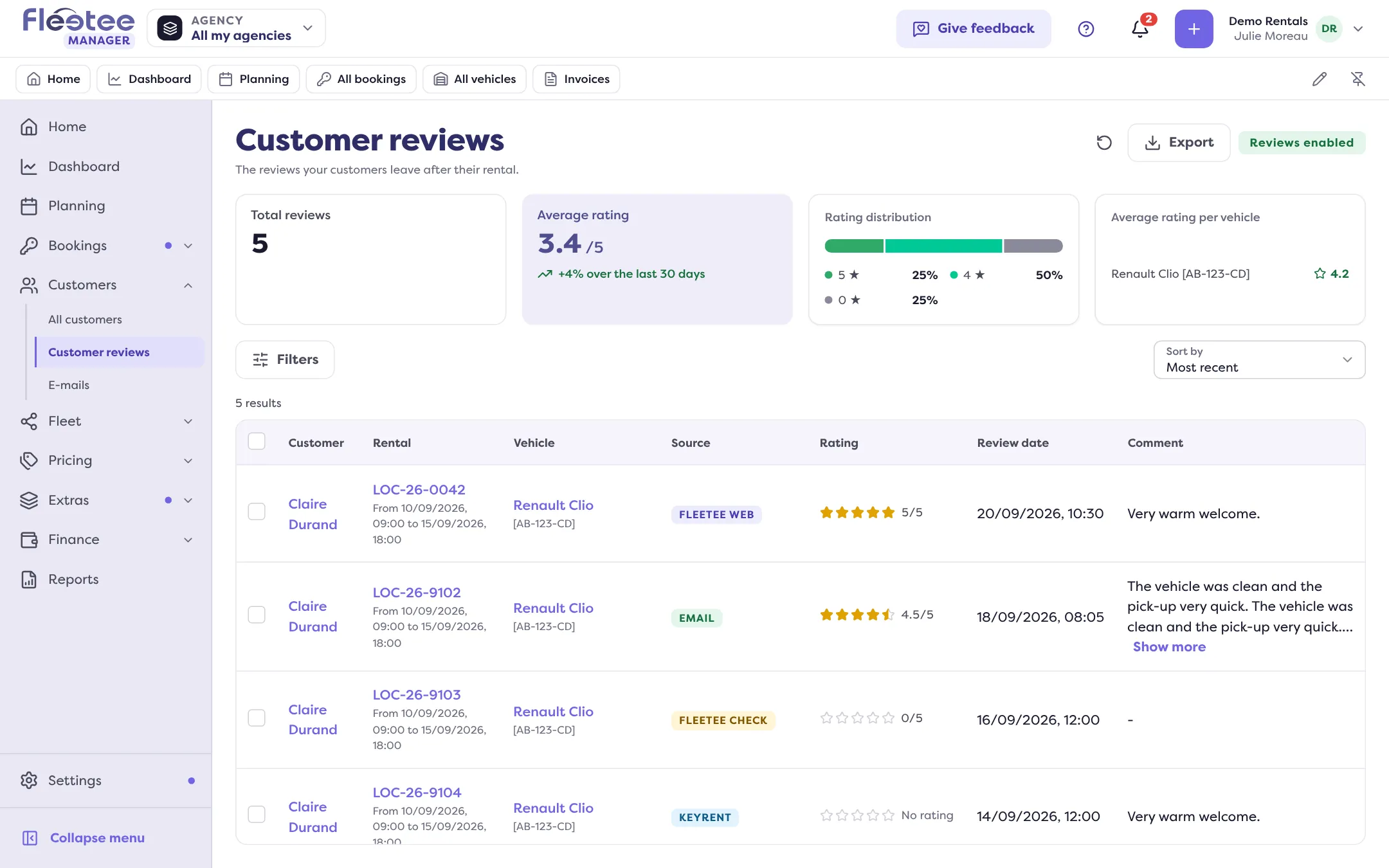
Filter by review date range, customer, rental reference, registration, rating, comment and, if you have several agencies, agency. “Clear filters” resets them. Sort by: Most recent, Oldest, Highest rating or Lowest rating. The list shows 40 reviews per page.
Export the reviews
Click “Export” at the top of the list (administrator and agency manager). The file uses the list’s filters, or only the ticked rows with “Export the selection”. Reviews with no rating are not exported. The file is prepared in Reports: see Build a custom report.
A customer’s or a vehicle’s reviews
- On a customer’s file, the Reviews panel gives their overall rating and each review left on a rental. See the customer file.
- On a vehicle’s file, the Reviews panel gives the reviews about that vehicle.
What next
The administrator can make a review public or delete it from these files: see Choose which reviews appear on my website. To be alerted when a review arrives, see Get notified when a customer leaves a review.
Where to find it: Customers › Customer reviews
Where to find it: Customers › Customer reviews
Go further
Updated on 18 November 2026 with version 3.0