

How do I turn on customer review collection?
- Manager v3
- Administrator
In short. Settings › Customer reviews: turn on “Collect customer reviews”. After each completed rental, the customer gets a review request by e-mail. You also set the alerts when a review arrives, and publication.
Your customers’ reviews reassure the next ones. Once collection is on, Fleetee asks each customer for their opinion, and you find the answers in Customers › Customer reviews.
Open Settings › Customer reviews
The page is called “Customer reviews”: collection, notifications and publication of reviews. Only the account administrator opens and changes these settings; an agency manager reads the reviews in Customers › Customer reviews.
Turn on “Collect customer reviews”
The setting is saved right away. In Customers › Customer reviews, the badge changes from “Reviews disabled” to “Reviews enabled”; an administrator can also click “Turn on reviews” there.
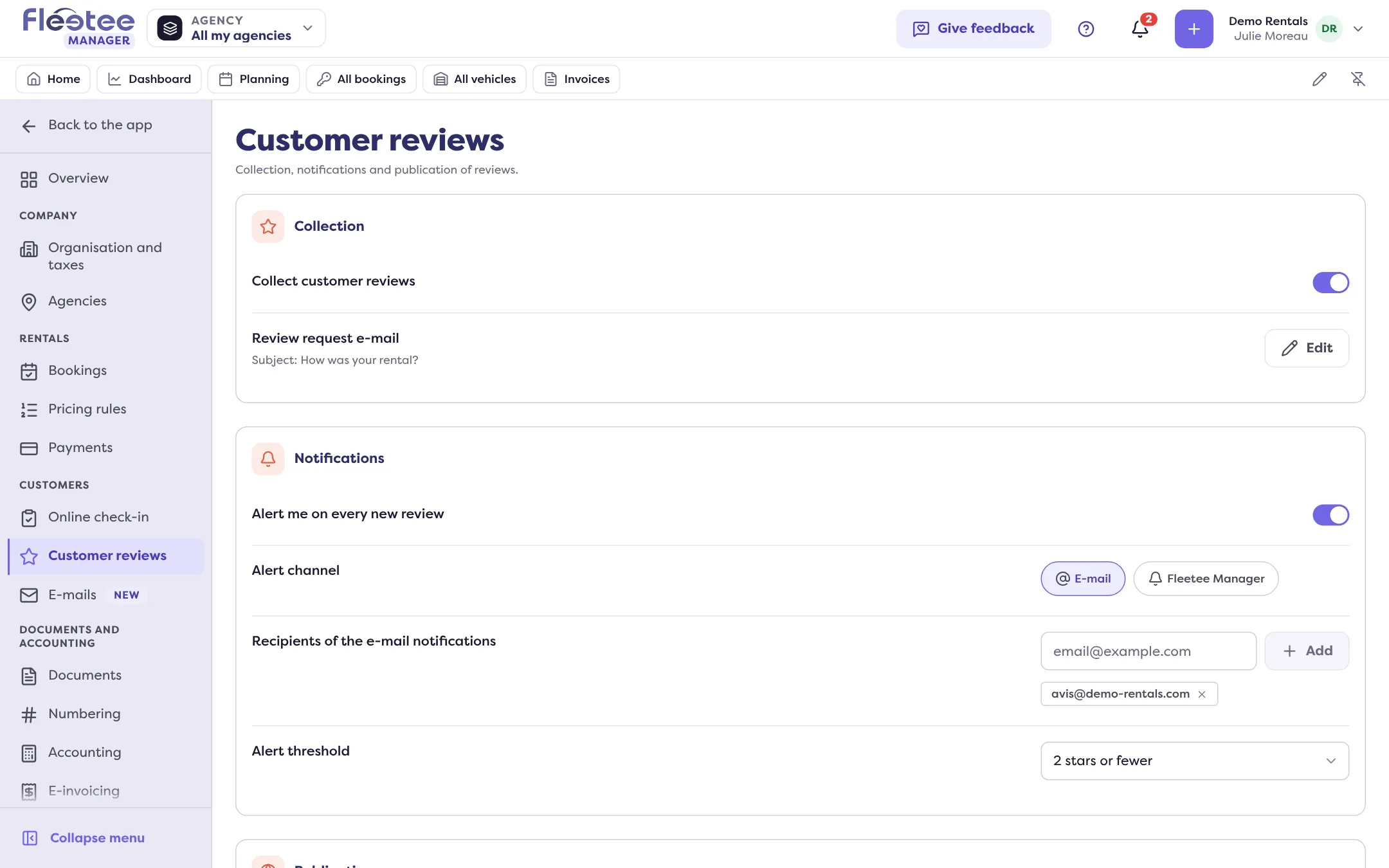
Read the review request e-mail
The “Review request e-mail” row shows its subject (by default, a question asking how the rental went). “Edit” opens the template in Settings › E-mails: see How do I customise an e-mail sent by Fleetee?.
Set the alerts (optional)
“Alert me on every new review”: choose the channel (E-mail, Fleetee Manager, or both), the recipients of the e-mail (with no address, the administrator and the agency managers of the booking) and the alert threshold: “N stars or fewer”, to react only to the lowest reviews.
Set publication (optional)
“Publish reviews automatically” makes public the reviews whose rating reaches the automatic display threshold (“N stars or more”). The Publication card appears if your company has a booking website.
When does the e-mail go out?
At the end of the rental: when the return inspection ends it, Fleetee sends the review request to the customer, if collection is on and the customer has an e-mail address. With no e-mail on the file, nothing is sent. The request goes out only once per rental.
Good to know
- Turning collection off: with the same switch, at any time. Your other settings are kept.
- A review with no comment cannot be made public: “Without a comment, this review cannot be made public.”
Read and manage reviews
Customers › Customer reviews lists the reviews (customer, rental, source, rating, date, comment), with the average rating, the breakdown and the trend over 30 days. The same rating shows on the customer’s file (Reviews panel) and on the vehicle’s. The administrator can make a review “Publicly visible” or delete it.
Where to find it: Settings › Customer reviews
Where to find it: Settings › Customer reviews
Go further
Updated on 18 November 2026 with version 3.0