

Can I change the customer form of the booking module?
- Web v2
- Administrator
- Marketing
In short. Yes, in part. In Réservation › Parcours › “Formulaire client”, choose the fields asked beyond name, phone and e-mail, and add questions and information texts. Address and nationality are set in Apparence.
The booking module’s form is the step where your customer introduces themselves. You can choose what it asks beyond the minimum, and add your own questions.
Fleetee Web is displayed in French. The names below are quoted as they appear on screen, with a translation in brackets when needed. The setting applies to the whole company.
What is always asked
The last name, first name, phone and e-mail address are always asked: they cannot be turned off.
Choose the extra fields
Open Réservation › Parcours › “Formulaire client”
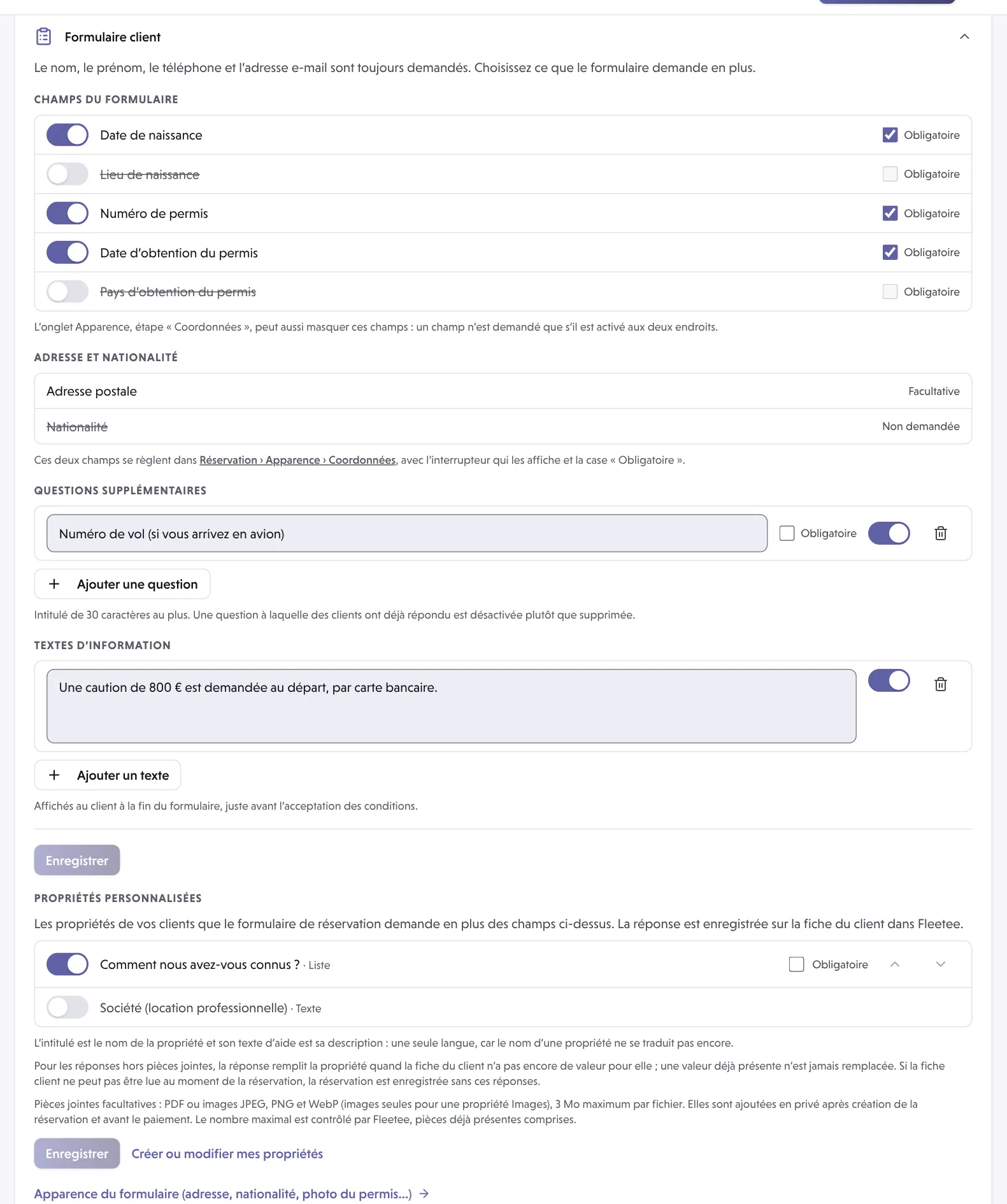
Expand the section. The Champs du formulaire (form fields) list offers five fields: Date de naissance (birth date), Lieu de naissance (birth place), Numéro de permis (licence number), Date d’obtention du permis (licence issue date) and Pays d’obtention du permis (licence country).
Turn on what you want to ask
The switch on each row (Demander, ask) shows the field; when off, the row is struck through. Tick Obligatoire (required) to make the answer mandatory.
Add questions (optional)
Ajouter une question (add a question): a label of 30 characters at most (flight number, stay address…), with Obligatoire and a switch to ask it or not. A question that customers have already answered is disabled rather than deleted. The characters < and > are not accepted.
Add information texts (optional)
Ajouter un texte (add a text): a message shown to the customer at the end of the form, just before the acceptance of the terms. A text cannot be empty.
Click “Enregistrer” (Save)
The button is active as long as a change is waiting to be saved.
Postal address and nationality
These two fields are not set here. The section recalls them (“Non demandée” not asked, “Facultative” optional, or “Obligatoire” required), but they are changed in Réservation › Apparence › Coordonnées, with the switch that shows them and the “Obligatoire” box.
A field of the customer form is only asked if it is on in both places: here and in the Coordonnées step of Apparence. If a field does not appear, check both.
What you cannot change here
You cannot rename the five original fields: their labels come from Fleetee. The presentation of each step is set in Réservation › Apparence (one tab per step, including Coordonnées). See How do I get my booking module up and running?.
For your site’s contact form, which is a different tool, see How do I publish a blog post or create a form?.
Where to find it: Réservation › Parcours › “Formulaire client”
Where to find it: Réservation › Parcours › “Formulaire client” (Booking › Journey › Customer form)
Go further
Updated on 18 November 2026 with version 2.0