

Which e-mails does my customer receive after booking online?
- Web v2
- Administrator
- Marketing
In short. Fleetee e-mails the customer at each step of their request: pending, confirmation, acceptance, refusal, and a payment reminder if turned on. You edit the subject and text in Réservation › Parcours › “E-mails envoyés au client”.
When a customer books on your site, Fleetee writes to them at each step of their request. You can adapt the text of each e-mail.
Fleetee Web is displayed in French. The names below are quoted as they appear on screen, with a translation in brackets when needed. These e-mails are about bookings made on the module. For the e-mails you send from Manager, see Which e-mails does Fleetee send to my customers automatically?.
The e-mails sent to the customer
| When the customer receives it | |
|---|---|
| E-mail de demande en attente (pending request) | As soon as they send their booking request. |
| E-mail de confirmation de réservation (booking confirmation) | When the booking is confirmed. |
| E-mail d’acceptation de demande (request accepted) | When you accept a request. |
| E-mail de refus de demande (request refused) | When you refuse a request. |
| E-mail de relance de paiement (payment reminder) | Once, after the chosen delay, if the reminder is turned on for your company and the booking is still unpaid. The link to resume payment is added to the message. |
The acceptance and refusal e-mails answer the requests you handle yourself (“Manuel” validation). With “Automatique” validation, the customer pays online and the booking is confirmed: see How do I get my booking module up and running?. The payment reminder only appears in the list when it is available for your company.
Edit an e-mail
Open Réservation › Parcours › “E-mails envoyés au client”
The section says: “Personnalisez les e-mails que Fleetee envoie à vos clients à chaque étape d’une demande de réservation” (customise the e-mails Fleetee sends your customers at each step of a booking request). If your settings are “Agence par agence” (agency by agency), choose the agency concerned.
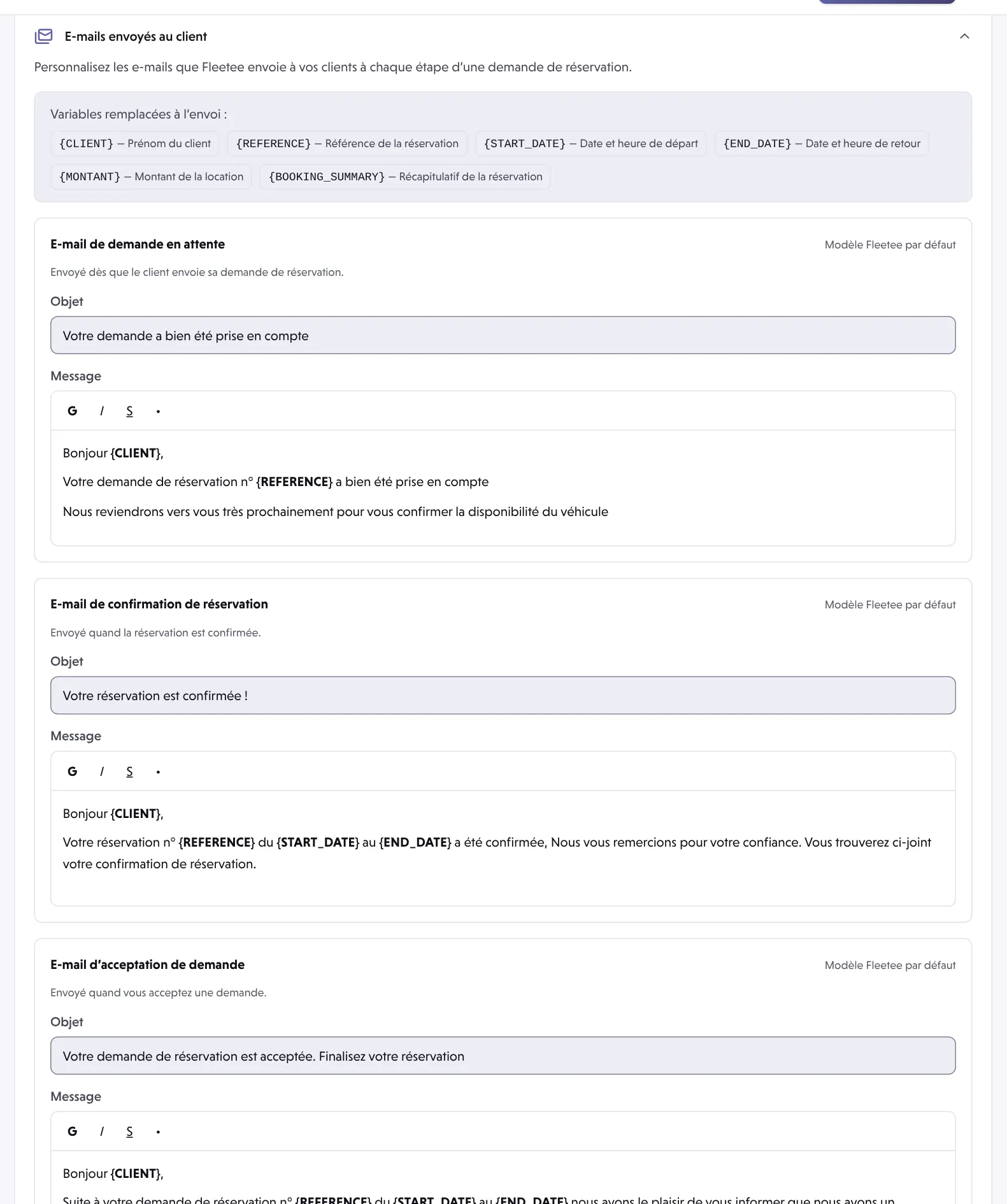
Check the source of each e-mail
To the right of the title: Modèle Fleetee par défaut (Fleetee default template), Modèle du compte (account template) or Personnalisé (custom; Personnalisé pour cette agence in agency-by-agency mode). This is what the customer receives today.
Edit the subject and text
The Objet (subject) field accepts 255 characters; the text accepts bold, italic, underline and lists. Variables are replaced when the e-mail is sent:
{CLIENT}(customer’s first name),{REFERENCE}(booking reference),{START_DATE}(departure date and time),{END_DATE}(return date and time),{MONTANT}(rental amount) and{BOOKING_SUMMARY}(booking summary).Click “Enregistrer” (Save)
Only the e-mails you changed are saved. Annuler (Cancel) drops the changes. The change applies to the next e-mails.
Your own notifications
The e-mails above are for the customer. On the same page, the Notifications section handles what you receive, for example Recevoir un e-mail pour les réservations non payées (receive an e-mail for unpaid bookings; off by default, one e-mail per accepted booking that is still unpaid). This notification is independent of the reminder sent to the customer.
If the customer receives nothing
First check the address the customer entered, then their spam folder. See My customer says they didn’t get an e-mail: what should I check?.
Where to find it: Réservation › Parcours › “E-mails envoyés au client”
Where to find it: Réservation › Parcours › “E-mails envoyés au client” (Booking › Journey › E-mails sent to the customer)
Go further
Updated on 18 November 2026 with version 2.0