

How do I show my customer reviews on my website?
- Web v2
- Administrator
In short. In Réservation › Avis clients, turn on “Afficher sur le site” review by review (or publish automatically from a rating), then place a “Témoignages” block with the source “Avis Fleetee (liés)” in a page. The site shows up to 12.
The reviews your customers leave do not show on your site by themselves: you choose which ones you show. The Réservation › Avis clients page lists them; the Témoignages (testimonials) block of a page displays them.
Fleetee Web is displayed in French. The names below are quoted as they appear on screen, with a translation in brackets when needed. Reviews arrive if you turned collection on: see How do I turn on customer review collection? and How do I set up my website’s customer area?. Only the account administrator can show a review or withdraw it, and set automatic publication; the Marketing role can read the list and asks the administrator to do it.
Open Réservation › Avis clients
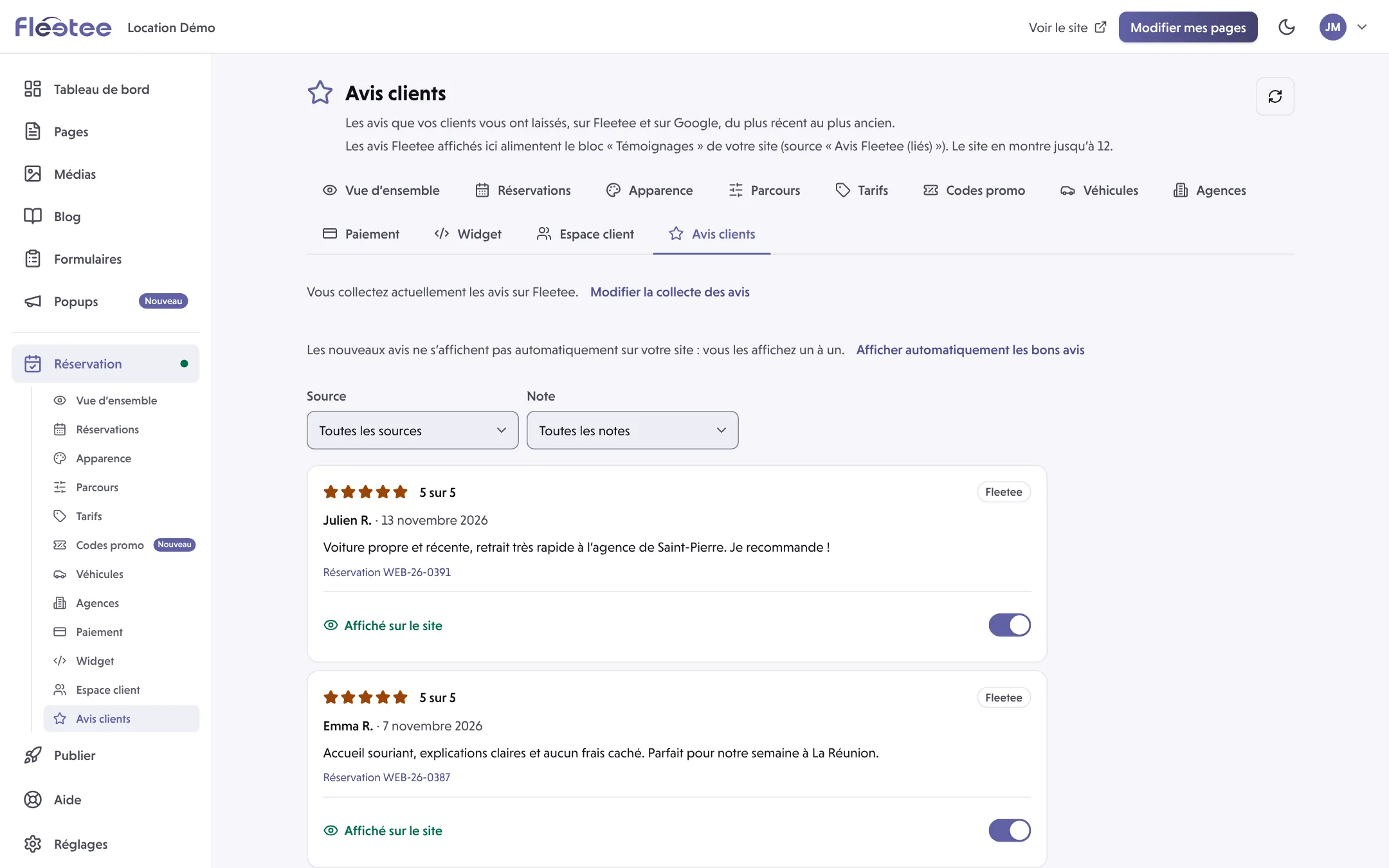
The page lists “les avis que vos clients vous ont laissés, sur Fleetee et sur Google, du plus récent au plus ancien” (the reviews your customers left, on Fleetee and Google, newest first). Filter by Source (Fleetee or Google) and by Note (rating), and use Actualiser la liste (refresh the list). Each review shows its author, rating, comment and the booking concerned.
Show the reviews you want to display
On each Fleetee review, the Afficher sur le site (show on the site) switch moves the review from Non affiché (not shown) to Affiché sur le site (shown on the site). Fleetee confirms (“Avis affiché sur votre site. Il apparaît dans les secondes qui suivent.”). To withdraw it, turn the switch off.
Or show good reviews automatically
In Réservation › Espace client, the Afficher les avis sur votre site card offers Publier automatiquement les avis de 4 étoiles et plus (publish automatically reviews of 4 stars and above; you choose the threshold, 1 to 5 stars). It only covers reviews received from the moment you turn it on: reviews already received stay as they are, so show them one by one in the list. It applies in Fleetee as soon as it is changed, with no site publication.
Place the “Témoignages” block in a page
In Pages, add a Témoignages block and choose the source Avis Fleetee (liés) (linked Fleetee reviews). Save the page, check the preview, then publish (see Save, preview, publish: what is the difference?).
Good to know
- A review with no comment is never shown on the site, even if you turn the switch on.
- The site shows up to 12 reviews at a time.
- Once the block is in place, showing or withdrawing a review shows on the site within seconds, with no new publication.
- Google reviews appear in the list (Google gives a selection of 5 reviews at most, ranked by relevance, not the full history), but it is the Avis Fleetee (liés) source that feeds the block: the switch only concerns Fleetee reviews.
- If the list is empty (“Aucun avis pour l’instant”), check that collection is turned on.
Where to find it: Réservation › Avis clients (Booking › Customer reviews)
Where to find it: Réservation › Avis clients (Booking › Customer reviews)
Go further
Updated on 18 November 2026 with version 2.0