

How do I track my website visits with Google Analytics?
- Web v2
- Marketing
In short. In Réglages › Suivi des visites, enter your Google Analytics 4 measurement ID (G-…), leave the switch on and save. Nothing loads until the visitor agrees in the cookie banner.
Google Analytics 4 measures your site’s audience: how many visitors, through which pages, with which bookings. Fleetee Web links it with an identifier, with no code to paste.
Fleetee Web is displayed in French. The names below are quoted as they appear on screen. You need a Google Analytics account: the measurement ID (“G-…”) is in the settings of your Google Analytics property.
Open Réglages › Suivi des visites
The Suivi des visites card lists your measurement and advertising tools: Google Analytics 4, Meta Pixel (Facebook), Google Ads, TikTok Pixel, Google Tag Manager and Snapchat Pixel.
Enter the ID in “Google Analytics 4”
The field expects an ID like
G-XXXXXXXXXX. An ID that does not start with “G-” is refused (“L’identifiant Google Analytics commence par « G- »”, the Google Analytics ID starts with “G-”). As soon as you type it, the tool switches on and its recommended conversions are prepared.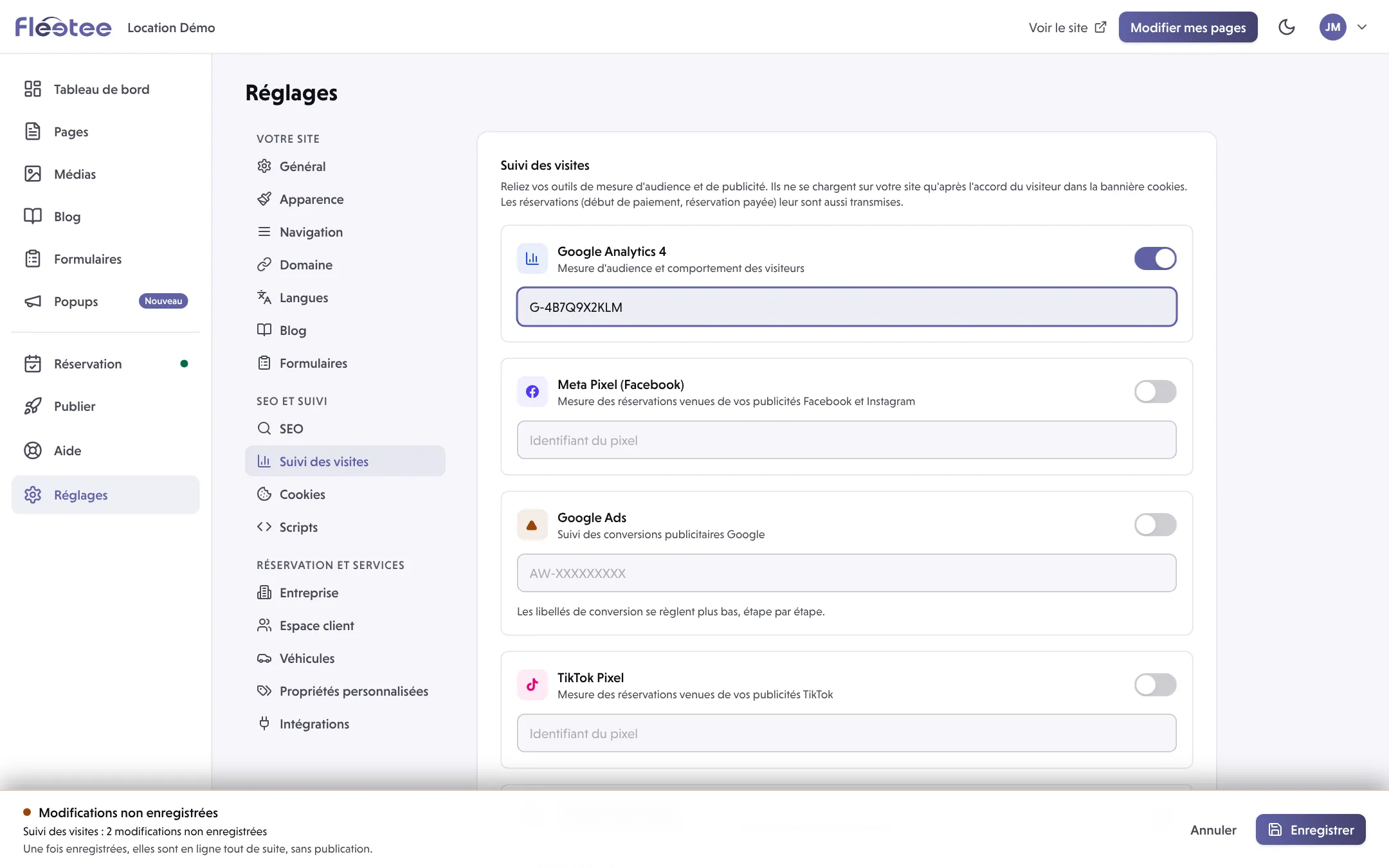
Check the switch
The switch on the row turns the tool on or off without erasing the ID. A tool with no ID cannot stay on.
Click “Enregistrer” (Save)
Nothing is stored before this click.
Try it with “Tester sur mon site” (Test on my site)
At the bottom of the screen, Tester sur mon site opens your site in test mode: a panel shows each event sent to your tools, with its data, while you make a booking. Only you see it. To leave: Quitter le mode test, or close the tab (the link expires after two hours).
What is measured, and when
- Nothing loads before the visitor agrees in the cookie banner. A visitor who refuses is not measured. The banner is set in Réglages › Cookies.
- Bookings are also passed to your tools: payment started, booking paid. The Ce que votre site envoie à chaque étape (what your site sends at each step) card shows the event sent at each step. It is already filled with each tool’s standard events; you can rename one, turn a step off or add a conversion. A booking is counted once.
- Customer data (name, e-mail, phone, licence) is never sent.
- Measurement happens on your Fleetee address and on your own domain name, not on the technical address of the site. Your site must therefore be published to be tested: see Save, preview, publish: what is the difference? and How do I connect my domain name to my website?.
In test mode, a booking you make is a real booking, and your tools really receive the events: they count in your statistics. Only Google Analytics marks them “débogage” (DebugView). Use the test to check, not to practise on real bookings.
You then find your site’s bookings in Where do I see the bookings made on my website?.
Where to find it: Réglages › Suivi des visites (Settings › Visit tracking)
Where to find it: Réglages › Suivi des visites (Settings › Visit tracking)
Go further
Updated on 18 November 2026 with version 2.0