

How do I extend a booking without overbooking?
- Manager v3
- Administrator
- Agency manager
- Rental agent
- 1:02
In short. In “Change the dates”, if another rental follows on the same vehicle, Fleetee suggests moving that one onto a free vehicle at the same price. You confirm, pick another vehicle, extend for less time or give up.
A customer keeps the vehicle longer, but another rental starts right after on that same vehicle. Fleetee no longer overbooks silently: it suggests moving the next rental, and you decide.
Open “Change the dates”
On the rental page, click “Change the dates”. From the Planning, stretching the end of the bar opens the same page, with the new date already filled in.
Choose the new end
In the “New period” card, enter the new dates and times. The price is recalculated: see Change a booking.
Read the “Vehicle booked next” card
If the vehicle is taken afterwards, the page says so: “… is booked next by LOC-… (customer) from …”. Then it suggests a solution, for example: “We suggest moving this rental to … (same category).”
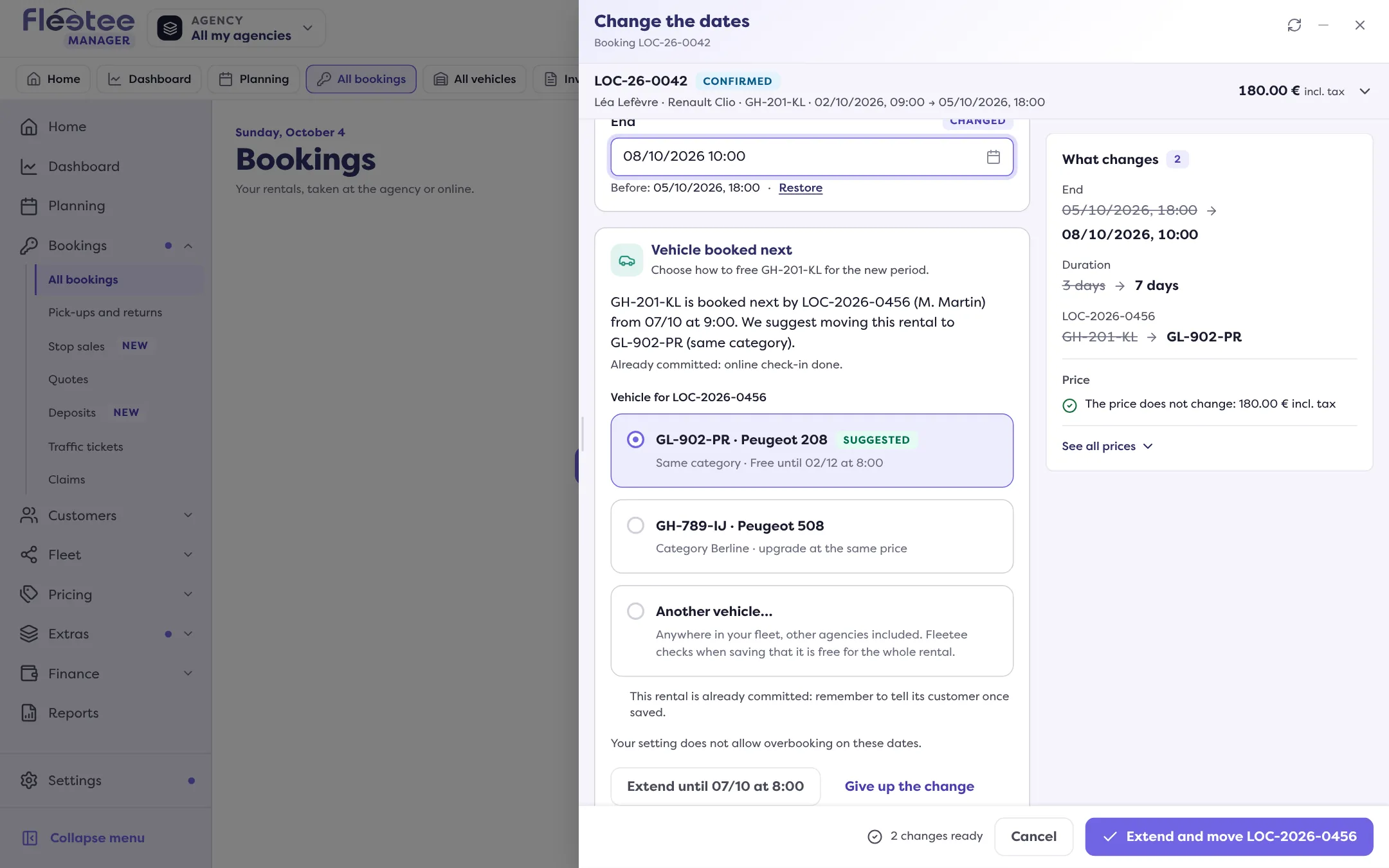
Answer “What should happen?”
- “Move LOC-…”: the next rental goes onto another free vehicle, at the same price. The suggested vehicle is marked “Suggested”; the list can also show a vehicle of another category (“upgrade at the same price”) or “Another vehicle…”.
- “Change the vehicle of this rental”: the rental you are extending changes vehicle.
- “Overbook”: both rentals will have the same vehicle. This choice only exists if your company’s Overbooking setting allows it (see below).
Save
The button states the choice: “Extend and move LOC-…”, “Extend and change vehicle” or “Extend and overbook”.
Tell the customer who was moved
After saving, the page says “LOC-… is now on …” with “View LOC-…” and “Tell …” (“Its customer has not been told.”). Fleetee sends no e-mail by itself: “Tell” opens the E-mails panel.
When no vehicle can take the next rental
The page writes “No vehicle can take LOC-…” and offers:
- “Extend until …”: the latest possible date;
- “Another vehicle…”: any vehicle of your fleet (other agencies included for an administrator) or of an agency manager’s agencies; a vehicle that is taken is refused when saving, with the reason;
- “Overbook”, if the setting allows it;
- “Give up the change”: nothing is saved.
The Overbooking setting is in Settings › Rentals › Bookings, “Creation rules” card: Everyone, Administrators only or Nobody. With “Administrators only” or “Nobody”, overbooking is refused or reserved to administrators, and the page says so.
What prevents moving the next rental
Fleetee names what blocks:
- the next rental has already left, has a replacement or has several vehicles;
- the vehicle is unavailable from a date (intervention, block, replacement): the page gives the date until which you can extend;
- it is in another agency than yours;
- if what you are extending is a quote or a request, it does not hold the vehicle: its new dates are saved without moving anything, and it never makes a confirmed rental move.
If the next rental is already committed (starts in less than 24 hours, digital key sent, online check-in done, contract signed, invoice validated), you can still move it, but remember to tell its customer: an amendment to the contract will need signing, and an invoice already validated keeps the old registration.
Where to find it: Rental page › “Change the dates”, or stretch the end of a bar in the Planning
Where to find it: Rental page › “Change the dates”, or stretch the end of a bar in the Planning
Go further
Updated on 18 November 2026 with version 3.0