

Why is no vehicle offered for my dates?
- Manager v3
- Administrator
- Agency manager
- Rental agent
In short. The usual causes: every vehicle of the category is taken, no vehicle is enabled, a stop sales covers the period, the agency is closed, or a season or duration rule applies. Each cause has its own check.
You are creating a rental and the list of vehicles is empty or greyed out for your dates. Check the dates first: a date already passed is flagged (“You picked a date or time that has already passed”), and if creating in the past is turned off for your company, it is blocked. Then go through the causes one by one.
Cause 1: every vehicle of the category is taken over the period
Under the Vehicle field, Fleetee counts: “N vehicles available for the period — M unavailable”. Vehicles that are taken sit in the unavailable vehicles group, marked “Unavailable”. A vehicle can be taken because it is rented, under an intervention or blocked.
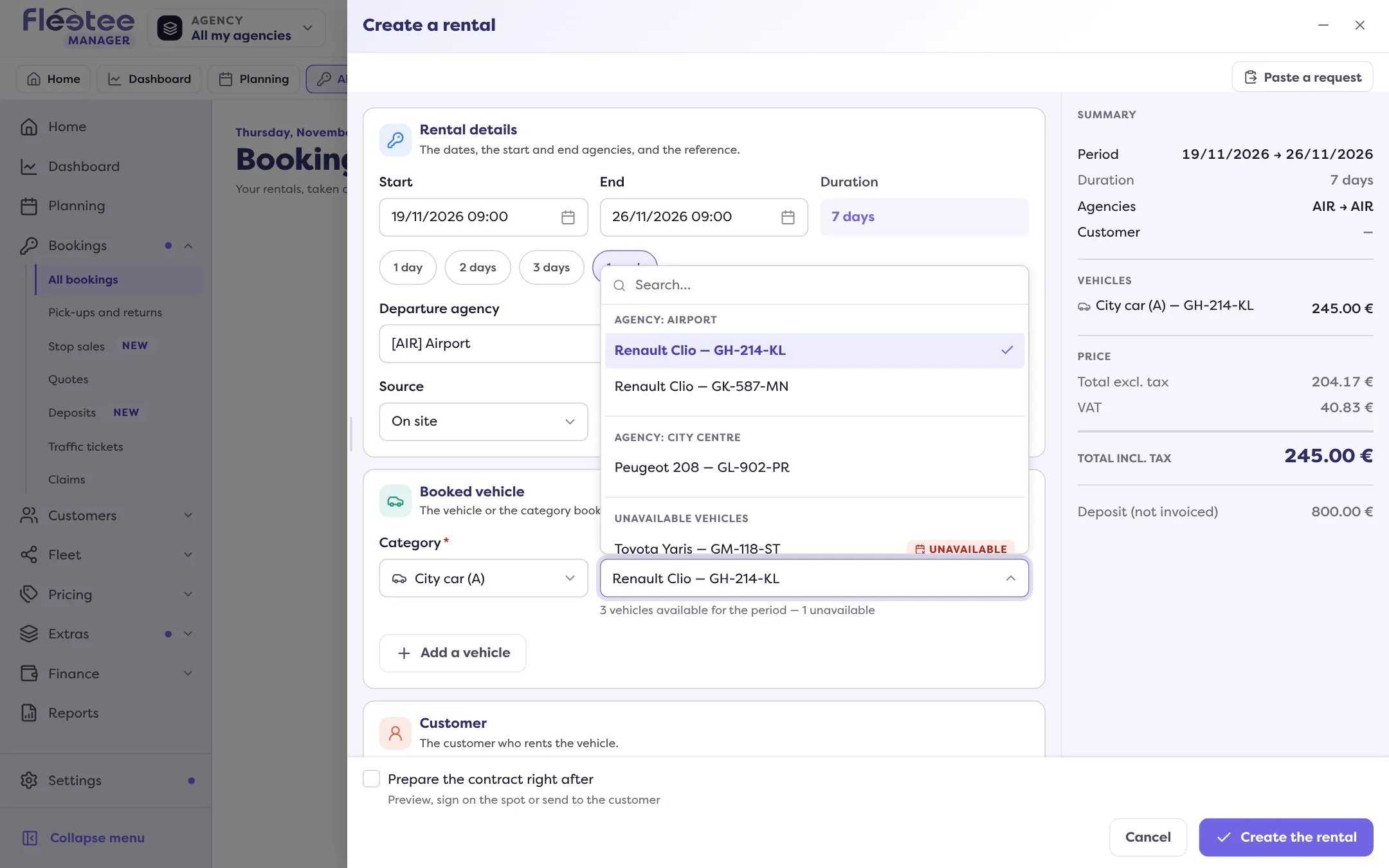
What to do
- Open the Planning and click “Free vehicles”: pick the range and read, for each vehicle, whether it is “Rented”, “Under intervention” or “Blocked”. See Read the bookings planning.
- Try another category, or other dates.
- To keep exact dates even with no free vehicle, the rental can be created with “Overbooking” if your company allows it. Otherwise the message says: “No vehicle is available for this period and overbooking is disabled for your company.” The Overbooking setting (Everyone, Administrators only, Nobody) is in Settings › Rentals › Bookings, “Creation rules” card.
- To extend an ongoing rental on a vehicle that is booked right after, see Extend a booking without overbooking.
Cause 2: no vehicle is enabled in the category
The page says “No vehicle is enabled in this category.” A disabled vehicle shows neither in the choices nor on the planning.
What to do Re-enable a vehicle of the category, or click “Create a vehicle”: the creation opens above the form without losing what you typed.
Cause 3: the vehicle belongs to another agency
Vehicles are grouped by agency, the departure agency first (“Agency: …”). A vehicle of another agency is flagged: “The vehicle belongs to another agency”.
What to do Pick the matching departure agency, or a vehicle of that agency. If creating “outside the criteria” is turned off for your company, this kind of warning blocks the creation.
Cause 4: a stop sales covers the period
A stop sales stops selling a category, a price list or an agency for a period, on the booking website and on the API. In the form, Fleetee shows a warning: “… on stop sales from … to …”. A stop sales can also limit the duration: “…: N days maximum, this rental lasts …”.
What to do Open Bookings › Stop sales to see what is in progress or coming (tabs Current and upcoming, Current, Upcoming, Ended). In Manager you can create despite the warning (“Create anyway”); on the website, the category stays off sale as long as the stop sales lasts.
Cause 5: the agency is closed
Fleetee writes “… closed for departures” or “… closed for returns”, with the period and, if it has a name, the closure.
What to do Choose an opening day or time, or check the hours, closures and exceptional openings in Settings › Company › Agencies.
Cause 6: a duration or season rule applies
A season can impose its own rule: minimum or maximum duration, departure or return days, notice before departure. Fleetee writes it, for example: “During the high season, the minimum duration is …: this rental lasts …”. It often suggests the fix: “Return on … at the earliest”.
What to do Adjust the dates according to the message, or review the season in Pricing › Seasons.
Still stuck?
Write to support with the category, the dates and the message shown.
Go further
Updated on 18 November 2026 with version 3.0