

How do I set the numbering of my invoices and documents?
- Manager v3
- Administrator
- Agency manager
- Accountant
In short. In Settings › Numbering, each document type has its prefix (10 characters at most), its format (with or without a date, reset daily, monthly, yearly or never) and its next number. Numbers already issued never change.
Numbering gives each document its reference: for example FACT-2026-0148. It is set per document type.
Open Settings › Numbering
The page is in the Documents and accounting section. It lists the documents in three groups: Rentals, Invoicing and Purchases. Each line gives the Prefix, the Format, the Next number and the Last issued. The types are: Rentals, Quotes, Contracts, Invoices, Credit notes, Payment receipts, Refund receipts and Purchase orders.
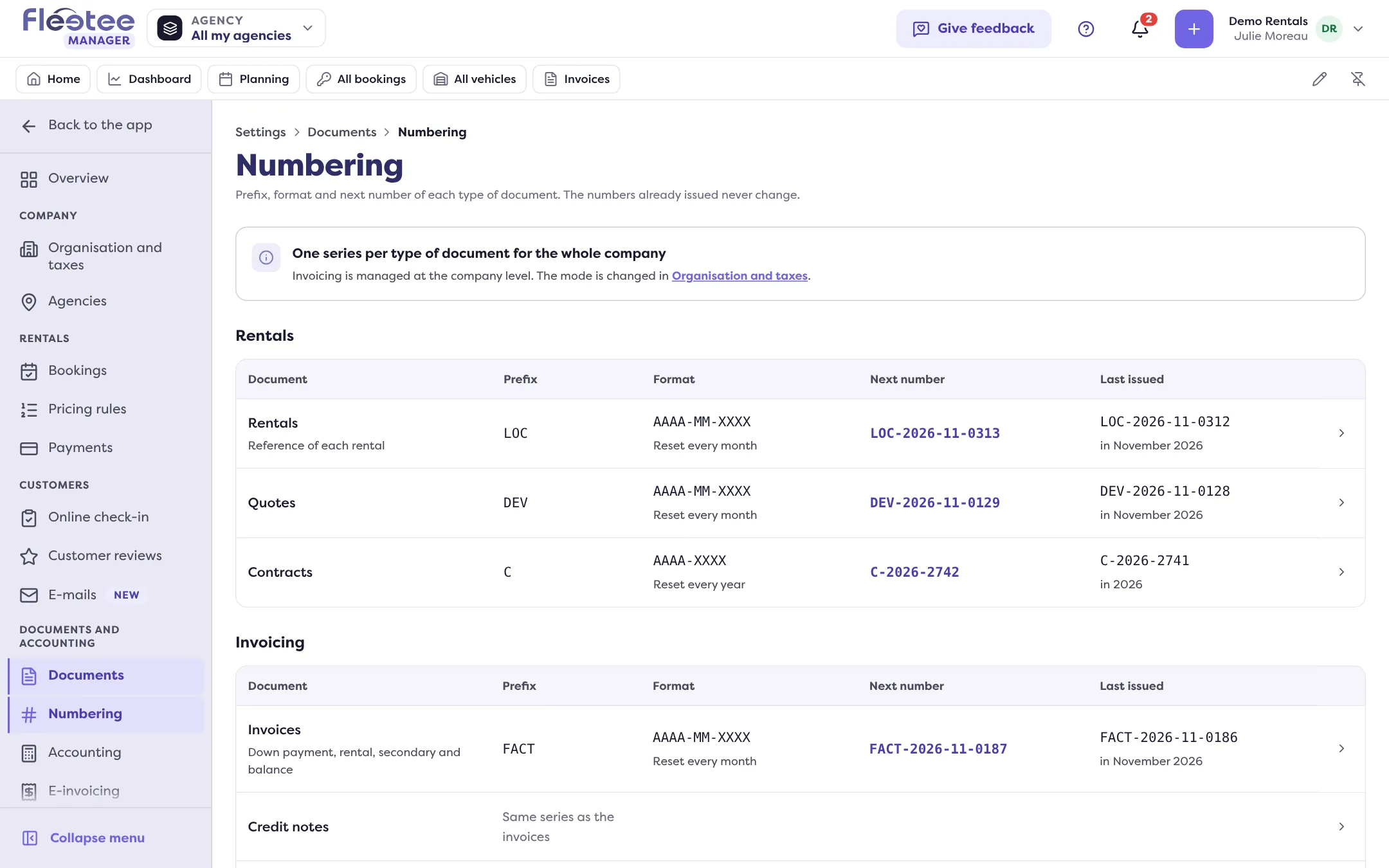
Click the line to change
A panel opens, for example “Invoice and credit note numbering”. An invoice has one series for the down payment, rental, balance and secondary invoices.
Set the prefix
Ten characters at most: unaccented letters, digits and . _ / - only. Without a prefix, the number starts with the date. A prefix already used by another numbering is refused (“Already used by the …”).
Choose the format
The format is the date then the counter: AAAA-MM-JJ-XXXX (reset every day), AAAA-MM-XXXX (every month), AAAA-XXXX (every year) or XXXX (never). The “First number of each period” applies at each reset; it never makes the counter go back.
Check the preview, then save
The panel shows the Next number and the Last issued. It is an estimate: the final number is assigned when the document is issued. If the series is already in use, Manager asks “Change a series already in use?”: issued documents keep their number, the next ones follow the new numbering.
Invoices must follow a continuous series: avoid changing it during the financial year.
Credit notes
In the invoices panel, the “Separate credit note series” switch gives credit notes their own prefix and counter. Without it, credit notes take the next number of the invoice series. A series not saved yet follows the invoices in the meantime.
A prefix refused by e-invoicing
An accent or a special character in the prefix prevents the invoices from being transmitted. The line then carries the badge “Characters refused by e-invoicing”: correct the prefix for the next documents; documents already issued keep their number. Read My invoices cannot be transmitted.
Several agencies
If invoicing is per agency, each agency has its own series; choose the agency at the top of the page. The mode (one series for the company, or one per agency) is changed in Settings › Organisation and taxes: read Invoice when you have several agencies.
Who can edit?
An administrator or an accountant edits the company’s numbering. For an agency, that agency’s manager can also edit theirs. Otherwise, the page is “Read only”.
Where to find it: Settings › Numbering
Where to find it: Settings › Numbering
Go further
Updated on 18 November 2026 with version 3.0