

I can’t create a booking’s final invoice
- Manager v3
- Administrator
- Agency manager
In short. The “Create a balance invoice” button only shows if there is a rental invoice, an amount left to invoice, and neither cancellation fees nor a group invoice to make first. Check the Invoices panel, cause by cause.
This is reserved to the administrator and the agency managers. With another role, ask one of them to do it.
Check first
Open the rental page, Invoices panel
The panel lists the invoices and offers the possible creations: “Create a down payment invoice”, “Create the booking invoice”, “Create a balance invoice”, “Create a cancellation invoice”, “Create a secondary invoice”.
Read the invoicing summary
It says “Left to invoice … of …” or “Invoiced in excess”. That figure decides the button.
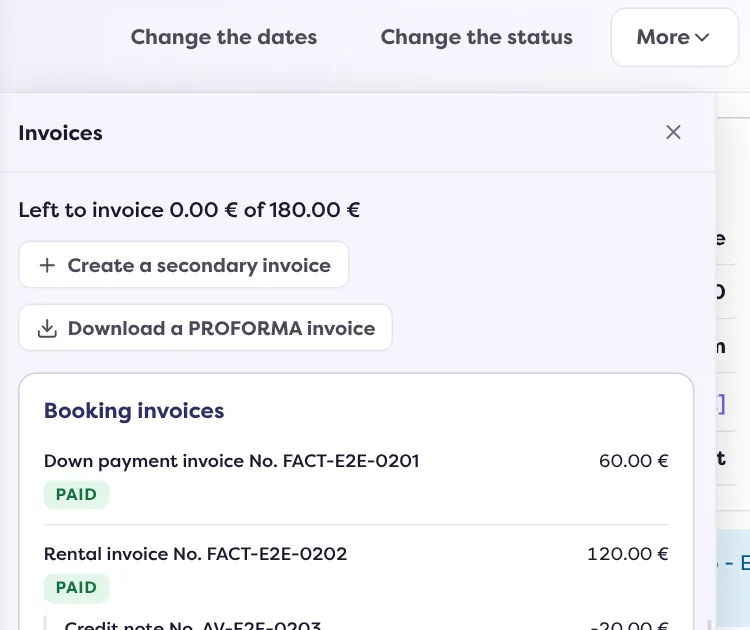
Look at the rental’s status
The “Invoice” button of the rental page only shows on a Completed rental. The Invoices panel, however, offers the creations at every status.
Cause 1: there is no rental invoice yet
The balance invoice comes after the rental invoice. Without a rental invoice, the panel offers “Create the booking invoice” instead. Create that one first: it bills the rental, then the balance bills the rest.
Cause 2: nothing is left to invoice
If the summary shows “Invoiced in excess”, or if the amount left to invoice is zero, there is no balance to invoice: the button is not offered. The amount is the one Fleetee calculates at invoicing: nothing is recalculated on screen. If you have just added an option or a fee, reopen the page to read the amount again.
Cause 3: the rental has cancellation fees
For a rental “Cancelled by renter”, in “Internal cancellation” or “No-show” with cancellation fees, the balance invoice is not offered: the panel offers “Create a cancellation invoice”, as long as it does not exist. The PROFORMA is not offered either in this case.
Cause 4: the rental is invoiced with its group
In a grouped rental invoiced with a single group invoice, the rental has no rental invoice of its own. The button becomes “Invoice with the group”, and the Manager says: “This booking is invoiced with its group: its invoice is made in the sheet of the group.”
While the group invoice is a draft: “The invoice of the group is still a draft: the balance invoice of this booking comes once the invoice of the group is validated.” Validate the group invoice first.
Cause 5: it is a quote, or a test rental
- A quote has no Invoices panel: convert it to a rental.
- In a test rental, the buttons are greyed out: “Not available in a test rental: nothing is saved or sent.”
Cause 6: the amount left is unknown
If Fleetee does not give the amount left to invoice (page not loaded properly), neither the rental invoice nor the balance invoice is offered, so as not to open a second invoice by mistake. Close and reopen the page. If it lasts, write to support.
The panel’s messages
If you land on the invoicing panel while the creation is not possible, it says why:
- “This rental has no rental invoice yet: create it first, the balance invoice comes after.” (cause 1)
- “There is nothing left to invoice on this rental.” (cause 2)
- “This rental has cancellation fees: it is invoiced with the cancellation fees invoice, not a rental or balance invoice.” (cause 3)
It is not a block: the invoice is a draft
If you clicked “Create the invoice” and the invoice shows “(draft)”, information is missing for e-invoicing: “Invoice saved as a draft”. Complete it, then validate: read How do I validate an invoice and send it to the customer?.
Still stuck?
Write to support with the rental number.
Go further
Updated on 18 November 2026 with version 3.0