

What types of invoices are there in Fleetee?
- Manager v3
- Administrator
- Agency manager
In short. A rental has its rental invoice, its balance invoice, and if needed a down payment, cancellation or secondary invoice. Add the credit note, which cancels an invoice, the pro forma, which is not an invoice, and the invoice with no rental.
These pages are reserved to the administrator and the agency managers. With another role, ask one of them.
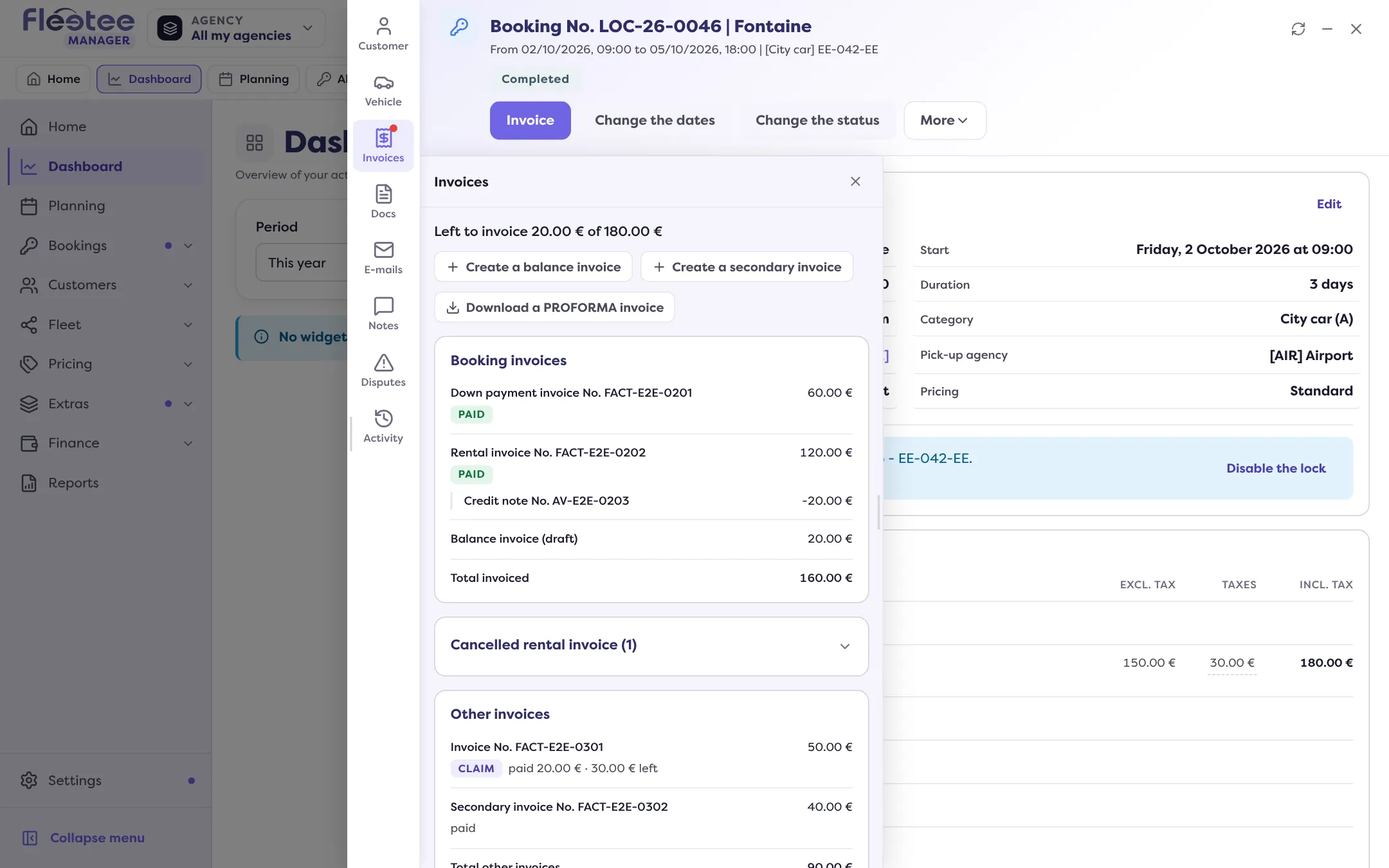
A rental’s Invoices panel sorts invoices into two groups: “Booking invoices” (down payment, rental, balance, cancellation) and “Other invoices” (secondary, claims, traffic tickets). Here is what each type means.
The rental’s invoices
- Rental invoice: the main invoice. It bills the rental as it was booked.
- Down payment invoice: it bills a sum paid before the rental invoice. Read Create a down payment invoice.
- Balance invoice: it bills what is left to invoice after the rental invoice (options, extension, return fees…). Read Create a rental’s balance invoice.
- Cancellation invoice: it bills the fees of a rental cancelled by the renter, or of a customer who did not show up. Read Bill cancellation fees.
Other invoices
- Secondary invoice: a free-form invoice, attached to the rental, for what does not fit the others. Read Create a secondary invoice.
- Claim or traffic ticket invoice: it carries the tag “claim” or “traffic ticket”. Read Re-invoice a traffic ticket and Bill a claim.
- Invoice with no rental: attached to a repair or to “Other”, with no linked object. Read Create an invoice with no rental.
The credit note
A credit note cancels all or part of a validated invoice. It appears under its invoice (“Credit notes of …”) with a negative amount. The invoice cancelled by a credit note is marked “Cancelled by credit note”. Read Cancel an invoice with a credit note.
The PROFORMA invoice
“Download a PROFORMA invoice” gives a PDF that simulates the rental invoice: nothing is recorded, no invoice is created. It is not offered when the rental carries cancellation fees.
Invoice statuses
| Status | What it says |
|---|---|
| Draft | not validated: it can be edited or deleted |
| Awaiting payment | validated, nothing paid yet |
| Partially paid | part of it is settled |
| Paid | fully settled |
| Unpaid | a status chosen by hand by the administrator or the agency manager, with “Change the status” |
| Credit note issued | a credit note was issued on the invoice |
| Cancelled by credit note | the credit note cancels the whole invoice |
| Cancelled, Void, Deleted | the invoice is out of play |
In Finance › Invoices, the tabs All, Drafts, To collect, Unpaid, Paid, Credit notes and Cancelled filter the list, and the Document type filter tells Invoice, Credit note and Down payment invoice apart.
Go further
Updated on 18 November 2026 with version 3.0